
From Chaos to Clarity: A Modern Student’s Guide to Effective Note-Taking
Every year, the back-to-school ritual begins. For many of us, it involves a trip to a big-box store with a list of supplies that has barely changed in a decade. We load up the cart with the usual suspects: a pile of cheap, single-subject spiral notebooks, a pack of pens that promise to give out mid-sentence, and flimsy paper folders destined to tear by mid-semester.
For years, this was my exact routine. I experimented, of course. I tried swapping eight flimsy notebooks for two bulky five-subject ones, hoping to consolidate. I tried stuffing every handout into the sad, overstretched pockets of a binder. I even invested in a zippered “Trapper Keeper” style binder, believing it was the key to preventing a waterfall of loose papers every time I opened my bag. Yet, every single year, the result was the same: frustration. My notebooks would lose their covers, the binder holes on my papers would rip, and my cheap pens would fail me at critical moments. My school supplies, meant to be tools for success, were a constant source of stress.
This cycle of disorganization prompted a change. I decided to find a system that was not only organized and efficient but also genuinely enjoyable to use. The solution wasn’t a single magic product, but a complete overhaul of my approach, combining the best of physical note-taking with the power of modern technology. This guide outlines the very system that transformed my study habits from chaotic to clear, and it can do the same for you.
The Foundation: Why Quality Materials Matter
The first and most crucial step in building a better note-taking system is to reject the “cheaper is better” mindset when it comes to your core supplies. My past experiences proved that low-quality tools lead directly to stress and inefficiency. Investing a little more in high-quality materials doesn’t just feel better; it fundamentally improves the entire process.
Choose a Pen You Love to Use
Instead of grabbing the first 10-pack of disposable pens you see, consider upgrading. I switched to Sharpie Pens, and the difference was night and day. They provide a smooth, consistent line that makes writing a pleasure. The ink is bold and clear, which not only looks better on the page but also makes your notes much easier to read and review later. Furthermore, a high-quality pen is less likely to smudge, a critical feature when you’re writing quickly in a lecture.
There’s also a psychological benefit. When you invest in a nicer pen, you’re more likely to keep track of it. You develop a sense of ownership, transforming a disposable tool into a trusted part of your academic arsenal. This small shift in mindset can have a surprisingly large impact on your motivation to take detailed, careful notes.
Embrace the Single Notebook System
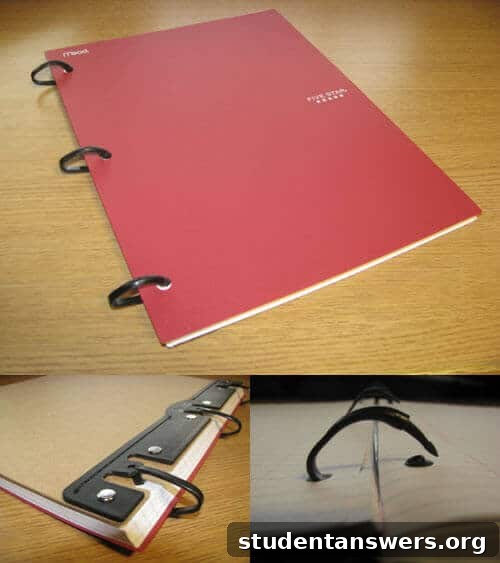
The next game-changer is to consolidate your paper. Instead of juggling a separate, flimsy notebook for each class, switch to a single, high-quality, refillable notebook. I found a durable one from Mead with a sturdy cover and a three-ring system that can be easily opened to add, remove, or rearrange pages. This approach offers several powerful advantages:
- Simplicity and Focus: With only one notebook to grab, you’re always prepared. No more digging through your bag to find the right one for your next class. You can use simple tabbed dividers to create a dedicated section for each subject.
- Portability: A single, well-organized notebook is far less bulky than a collection of spirals and binders. This allows you to downsize from a heavy backpack to a smaller, lighter laptop bag, making your commute across campus much more comfortable.
- Systematic Archiving: The beauty of a refillable system is what you do with old notes. Once a section for a particular class becomes too full, or after an exam, you can remove those pages and file them away in a dedicated binder or filing box at home. This keeps your active notebook light and relevant, containing only what you need for your current studies.
The Digital Brain: Supercharge Your Notes with Evernote
If high-quality physical tools are the foundation, then integrating a digital service like Evernote is the masterstroke that elevates your system to a new level. Once you incorporate this workflow into your academic life, you’ll wonder how you ever managed without it. Evernote is a powerful application designed to capture, organize, and access information across all your devices.
You can type notes directly, clip articles from the web, save audio memos, and, most importantly for this system, import scanned documents. But its true power lies in one revolutionary feature.
Evernote Makes Your Handwritten Notes Searchable
You read that correctly. When you scan your handwritten notes and upload them to Evernote, its powerful Optical Character Recognition (OCR) technology processes the image and makes the text within it fully searchable. Have you ever wished for a “Ctrl+F” for your life? Evernote delivers precisely that. Imagine you’re studying for a history final and need to find every mention of the “Marshall Plan” in your notes. Instead of flipping through hundreds of pages, you can simply type the term into Evernote’s search bar, and it will instantly highlight every instance in your own handwriting.
This feature is a complete game-changer for reviewing and studying. It saves an incredible amount of time and ensures you can find key concepts, definitions, and formulas in seconds, no matter how many pages of notes you’ve accumulated over the semester.
Access Your Notes Anywhere, Anytime
Evernote is a cloud-based service with applications for every major desktop and mobile platform (Windows, macOS, iOS, and Android). This means your entire library of notes is synchronized and available wherever you are. You can scan your notes on your home printer, and moments later, pull them up on your phone to review while on the bus. You can access them on a library computer through the Evernote website. This cross-platform availability means you can safely file away the physical paper copies, knowing that a secure, searchable digital version is always in your pocket.
The Simple Workflow: From Paper to Cloud
Getting your notes into Evernote is straightforward, but a few optimizations can make the process seamless. The free version of Evernote provides a generous monthly upload limit, which is more than enough for scanned documents if you use the right settings.
- Scan Your Notes: Use an all-in-one printer/scanner. While the default setting might be a high-resolution 300 DPI (dots per inch), this creates unnecessarily large files.
- Optimize Your Settings: For Evernote’s OCR to work its magic, you only need about 75-100 DPI. Change your scanner’s settings to this lower resolution and set the color mode to grayscale or black and white. This will dramatically reduce the file size of each page.
- Upload and Organize: Save the scanned files as PDFs and upload them into a designated notebook in Evernote, such as “Fall Semester 2024.” You can create separate notebooks for each class (e.g., “HIST 101,” “CHEM 230”) for even better organization.
- Tag for a Deeper Connection: Use Evernote’s tagging feature to add another layer of organization. You could tag notes with keywords like “Exam 1 Material,” “Essay Topic,” or specific concepts that span multiple lectures.
Today, you don’t even need a dedicated scanner. Smartphone apps like Evernote Scannable, Microsoft Lens, or Adobe Scan can turn your phone’s camera into a high-quality document scanner, making this process even more convenient.
Your Path to Organized, Stress-Free Studying
This hybrid note-taking system combines the proven cognitive benefits of writing by hand with the unparalleled organizational power of digital tools. By investing in quality supplies you enjoy using, you make the act of taking notes more pleasant and effective. By consolidating into a single, refillable notebook, you eliminate physical clutter and simplify your daily routine. Finally, by creating a searchable digital archive in Evernote, you equip yourself with a powerful “second brain” that makes studying more efficient than ever before.
Stop the cycle of disorganized binders and stressful searching. It’s time to build a system that works for you, not against you. Go out and find a notebook and pen that you love, download a scanning app, and take the first step toward a more organized and successful academic journey.