

How I Used ‘Productive Laziness’ to Automate My Job with a Simple Script
This is a story about how a healthy dose of laziness led to an innovative solution that could, in theory, automate your entire job. While that might be a stretch, the principle behind it is powerful. It’s about channeling the desire to avoid tedious work into creating smarter, more efficient processes. It’s a tale of how I turned a dreaded, mind-numbing task into an opportunity for creativity and a day of watching movies.
This journey into what my friend Zach Sexton from Asian Efficiency calls “lazy innovation” will hopefully inspire you to look at your own repetitive tasks not as burdens, but as puzzles waiting to be solved. Let’s explore how working smarter, not harder, is more than just a cliché—it’s a strategy for success.
The Two Faces of Laziness: Which One Are You?
In my experience, there are two fundamental types of lazy people in the world. Understanding the difference is key to unlocking your own potential for innovation.
- Passive Laziness: This is the person who avoids tedious work simply by not doing it. They procrastinate, make excuses, and ultimately let tasks pile up. This type of laziness leads to missed deadlines and added stress.
- Productive Laziness: This is the person who despises tedious work so much that they invest upfront effort to eliminate it forever. They are too lazy to perform the same boring clicks and keystrokes day after day, so they build a system or a tool to do it for them.
I am, without a doubt, a productively lazy person. The thought of spending hours on a repetitive, manual process is my personal nightmare. I would rather spend several hours of intense, creative problem-solving to build an automated solution than simply follow a boring, pre-written script. This mindset is the breeding ground for innovation.
As Doctor Octopus once said of Peter Parker, “Brilliant but lazy.”
Productively lazy individuals are natural innovators. They are the ones who ask, “How can we make this better?” instead of just accepting the status quo. They see a long, winding road of manual labor and immediately start looking for a shortcut—or better yet, a way to build a vehicle to travel that road instantly.
The Internship and the Soul-Crushing Project
My journey began during a summer internship in the IT department of a large financial company. Like any eager intern, I was ready to tackle any challenge thrown my way. One morning, a senior colleague approached my desk, his eyes betraying a hint of pity.
“I’ve got a special project for you, Thomas. If you’re up for it.”
Naturally, my can-do intern attitude kicked in. I accepted with a smile, ready to prove my worth. He then unveiled the task, and my initial enthusiasm quickly faded into quiet dread.
He showed me a web-based tool used to manage the company’s hundreds of servers. The screen was an almost endless list of server names. The project was as follows:
- Click on a server from the list.
- Navigate to its settings panel.
- Manually change several settings: check a few boxes, select an option from a dropdown menu, and type specific text into a couple of fields.
- Click the “OK” button to save the changes.
- Wait for the system to process the update, which took nearly a minute.
- Return to the main list and repeat the process for every single server.
There were hundreds of them. My colleague estimated the project would take me all day, perhaps even two full days of non-stop, repetitive clicking. I was looking at a solid 8 to 16 hours of a digital assembly line. Click, navigate, check, type, click, wait. Repeat. It was the definition of a mind-numbing task, a modern-day Sisyphus pushing a digital boulder.

As he walked away, my “productive laziness” took over. “There is absolutely no way I’m doing this manually,” I thought. The question was, what was the alternative?
Finding the Escape Route: An Introduction to GUI Automation
My first thought was that a senior engineer could surely write a complex script to handle this on the backend. But since the task had been handed to an intern for manual execution, it was clear that a simple backend solution wasn’t available. I was stuck with the graphical user interface (GUI)—the slow, clunky web tool.
Then, a lightbulb went on. What if I could interact with the GUI as required, but it wasn’t actually *me* doing the clicking and typing? What if a program could do it for me?
I remembered an open-source project I had experimented with called Sikuli. Developed at MIT, Sikuli is a powerful automation tool that uses a unique approach: it combines Python scripting with image recognition. In simple terms, you can tell your computer what to do by showing it screenshots. Instead of programming with abstract code, you program with visual cues from your own screen.
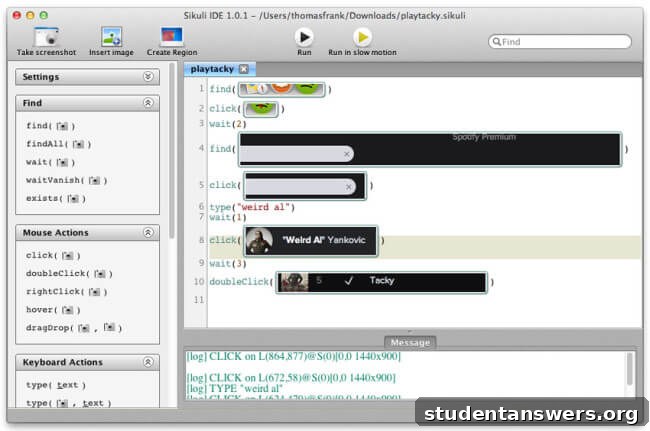
Sikuli was the perfect tool for this job because it didn’t need special access or an API. It could “see” and interact with the screen just like a human user, making it ideal for automating tasks within any application, no matter how restrictive.
Building My Digital Assistant: Crafting the Sikuli Script
With a clear path forward, I began building my solution. First, I manually processed a few servers to understand the exact sequence of actions. I documented every click, every piece of text, and every delay. This workflow analysis was the blueprint for my script.
Next, I started writing the script in Sikuli’s intuitive IDE. The process involved taking small screenshots of each element I needed to interact with—the server links, the checkboxes, the input fields, and the “OK” button. These images became the targets for my automation commands. Sikuli’s command set is both simple and powerful:
click("image.png"): This command searches the entire screen for the image you provide (e.g., a screenshot of a “Submit” button) and clicks on it. It’s incredibly precise.type("some text here"): This command types a string of text into the currently active input field, just as if you were typing on the keyboard.wait(seconds): This is a crucial command. I used it to tell the script to pause and wait for the slow web tool to load after saving each server’s settings. Without this, the script would move too fast and fail.find("image.png"): This function can be used to verify that a specific element has appeared on the screen before proceeding, making the script more robust and less prone to errors.
After about an hour of development, testing, and refining, my script was complete. It was a perfect digital replica of the manual process, ready to execute hundreds of times without complaint or error. I set up my workspace for the final phase of my plan. On my primary monitor, I positioned the server tool. On my second monitor, I queued up Netflix. With Iron Man 2 ready to play, I hit “Run” on my Sikuli script.
The Sweet Reward: Automation in Action
The effect was immediate and magical. The mouse cursor started moving on its own, methodically clicking through the server list, applying the settings with perfect precision. My computer was now doing my job for me. While the script diligently worked, I leaned back, put on my headphones, and enjoyed the movie.
My Sikuli script had two significant advantages over me:
- It never got bored or distracted. Its focus was absolute, eliminating any chance of human error that would inevitably creep in after hours of such monotonous work.
- It didn’t need breaks. The script continued to run flawlessly through my lunch break, maximizing its efficiency throughout the day.
Just before it was time to leave for the day, the script processed the final server and stopped. The entire, multi-day project was complete. I walked over to my colleague’s desk to report my progress.
“Finished already?” he asked, surprised.
“Yep,” I replied. “And to be honest, I spent most of the day watching movies while my computer did the work.”
I explained how I had used Sikuli to automate the entire task. Far from being annoyed, he was impressed and asked me to show him how it worked. I had not only completed the project in record time but had also introduced a new, powerful tool to the team.
Key Takeaways: How to Embrace Productive Laziness
This experience taught me a valuable lesson: the most impactful employees don’t just complete the tasks they are given; they fundamentally improve how the work gets done. Here is how you can apply this mindset:
- Challenge Repetitive Work: The next time you are faced with a boring, repetitive task, don’t just sigh and start clicking. Ask yourself, “Is there a way to automate this?”
- Identify Automation Candidates: Look for patterns in your daily workflow. Any task that involves a predictable sequence of steps is a prime candidate for automation.
- Explore Accessible Tools: You don’t need to be a programmer to automate. Tools like Sikuli, Zapier, and Microsoft Power Automate are designed to make automation accessible to everyone, regardless of their technical skills.
- Invest Time to Save Time: It took me an hour to build the script, but it saved me over seven hours of manual labor. This upfront investment in automation pays massive dividends over time.
By embracing productive laziness, you can transform tedious parts of your job into opportunities for innovation, freeing up your time and mental energy for more creative, high-impact work. What is your “Sikuli moment” waiting to be discovered?