
BlackBerry Q10 In-Depth Review: Is the QWERTY Legend Still Relevant?
In a world dominated by expansive, all-touchscreen smartphones, the BlackBerry Q10 stands as a bold testament to a different era. For many, the name BlackBerry evokes a sense of nostalgia for the days of tactile keyboards, BBM chats, and a focus on pure productivity. The Q10, running the modern BlackBerry 10 operating system, was the brand’s attempt to merge its beloved physical keyboard with the features of a contemporary smartphone. But in a competitive market, does this unique hybrid hold its own? This comprehensive review revisits the BlackBerry Q10, examining its strengths, weaknesses, and its place in smartphone history.
We’ll dive deep into its design, the legendary keyboard, the innovative operating system, and how it stacks up against a full-touch competitor like the HTC One. This analysis will determine if the Q10 was a niche masterpiece or a relic of a bygone age.
A Quick Look: BlackBerry Q10 Pros and Cons
Before we delve into the details, here’s a summary of what makes the BlackBerry Q10 shine and where it falls short.
- The Best Of: The physical QWERTY keyboard is simply unparalleled for typing speed and accuracy. The device boasts a vibrant Super AMOLED display, a surprisingly capable camera, and exceptional battery life. The BlackBerry Hub is a masterclass in unified communications.
- The Worst Of: The BlackBerry World app store suffered from a significant lack of popular applications compared to iOS and Android. The smaller, square screen is not ideal for media consumption or gaming, and the gesture-based navigation can occasionally feel cramped.
Design and Ergonomics: A Premium, Pocket-Friendly Build
From the moment you pick up the BlackBerry Q10, it feels like a premium, well-crafted device. Eschewing the plastic-heavy trend of its time, the Q10 features a sturdy frame and a unique glass-weave back cover that is both durable and pleasant to the touch. The stainless steel frets separating the keyboard rows add a touch of class and structural integrity. It’s a design that speaks to BlackBerry’s heritage of building reliable tools for professionals.
Its compact size is a refreshing change from the ever-growing phablets. The Q10 fits comfortably in one hand, making one-handed typing and navigation not just possible, but natural. It slides into a pocket without creating an unsightly bulge, a small but significant quality-of-life advantage. While a larger device like the HTC One offers more screen real estate, the Q10’s sheer portability and ergonomic comfort are undeniable highlights.
The Star of the Show: An Unbeatable QWERTY Keyboard
Let’s be clear: the primary reason to consider a BlackBerry Q10 is its physical keyboard. And it does not disappoint. This is the culmination of years of BlackBerry perfecting tactile input. Each key is expertly sculpted and spaced, providing satisfying travel and a distinct click that makes typing a genuine pleasure. For anyone who writes long emails, sends countless text messages, or engages heavily on social media, no touchscreen keyboard can replicate this experience’s speed, accuracy, and comfort.
The keyboard isn’t just for typing letters. It’s integrated with the OS for powerful shortcuts. You can start typing on the home screen to instantly search for a contact, app, or file. This “Instant Action” feature streamlines workflows and saves precious time. Compared to the software keyboard on the HTC One, the Q10 is in a league of its own for pure communication efficiency. Typing in the rain, with gloves on, or without looking at the screen—these are scenarios where the physical keyboard proves its enduring value.
BlackBerry 10 OS and the Brilliant BlackBerry Hub
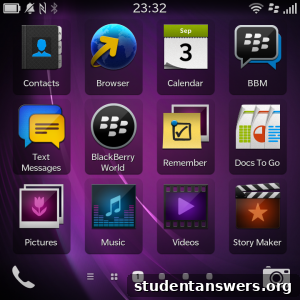
The BlackBerry 10 operating system was a modern, gesture-based platform designed from the ground up. Its core philosophy revolved around the “BlackBerry Hub,” a true universal inbox. This feature consolidates every notification—emails, BBM, texts, social media alerts, missed calls—into a single, unified stream. You can “peek” into the Hub from any app with a simple swipe, allowing you to check messages without ever leaving what you’re doing. It’s an incredibly powerful tool for staying connected and organized, making other notification systems feel fragmented in comparison.
Navigation is handled by swiping. A swipe up from the bottom bezel closes an app and reveals your “Active Frames,” which are live widgets for your currently running applications. While this is intuitive in theory, the Q10’s limited screen size can sometimes cause issues. An upward swipe intended to close an app can be misinterpreted as a tap on an icon at the bottom of the screen. It’s a minor frustration that one adapts to over time, but a slightly larger screen would have eliminated this friction entirely.

Camera Performance: A Surprisingly Capable Snapper
While not marketed as a camera phone, the 8-megapixel rear camera on the BlackBerry Q10 is surprisingly competent. In well-lit conditions, it produces sharp, vibrant images with accurate colors. The shutter speed is impressively fast, making it great for capturing fleeting moments without motion blur. This is a significant advantage over a device like the HTC One, which, despite its “Ultrapixel” technology, had a noticeably slower shutter that could lead to missed shots.
The camera software includes useful features like Time Shift, which captures a burst of frames and allows you to select the best expression for each person in a group photo. Of course, like most smartphone cameras of its era, the Q10 struggles in low-light environments, where noise becomes more apparent. However, for everyday photography, it is a reliable and quick performer that exceeds expectations.
Multimedia and The App Gap
This is where the BlackBerry Q10’s design trade-offs become most apparent. The 3.1-inch, 1:1 aspect ratio screen, while sharp and vibrant thanks to its Super AMOLED technology, is simply not built for media consumption. Watching videos results in large black bars, and many games are designed for a wider 16:9 format. The phone’s loudspeaker is clear and loud for calls and music, and the inclusion of a microSD card slot for expanding storage is a welcome feature. However, the overall multimedia experience is a compromise.
The biggest challenge for the platform was the “app gap.” While BlackBerry World was better curated than its predecessors, it critically lacked many of the flagship apps available on Android and iOS. The absence of key banking apps, popular games, and niche social platforms was a major deterrent for many users. While BlackBerry made efforts to add music and video stores, the ecosystem felt underdeveloped compared to the competition. For users deeply invested in the Google or Apple app ecosystems, the HTC One was the clear winner in this category.
Conclusion: A Masterpiece for a Specific User
After extended use, the BlackBerry Q10 reveals itself as a phenomenal communication device. Its battery life is outstanding, easily lasting through a full day of heavy use—a refreshing change from the daily charging ritual required by many of its contemporaries. The QWERTY keyboard is, without exaggeration, a dream to use.
The Q10 was never meant to be a phone for everyone. It was a purpose-built tool for professionals, writers, and anyone who valued communication efficiency above all else. For those users, it was a nearly perfect device. It offered a premium build, a fantastic typing experience, and the best unified inbox on the market. However, its small screen and the anemic app store made it a tough sell for those who used their phone primarily for entertainment and media.
Today, the BlackBerry Q10 exists as a fascinating piece of tech history. While the lack of modern app support and security updates makes it impractical as a primary device, it stands as a reminder that there is more than one way to design a smartphone. It represents a pinnacle of design for a specific philosophy: that for true productivity, nothing beats the feel of a physical key beneath your thumb.