

How to Create the Ultimate Productive College Desk Setup
As a student, especially in a tech-focused field like information systems, it’s easy to fall into the trap of believing more hardware equals more productivity. The allure of a high-tech “command center” is strong. I learned the hard way that a desk overflowing with gear can quickly become the biggest obstacle to getting real work done. My journey started with a desk so dedicated to my computer that there was no room for a single textbook.
My entire freshman year was an exercise in turning my small dorm room desk into a digital fortress. I had multiple screens, a large keyboard, and various peripherals. It looked impressive, but when it came time to study for finals or write an essay by hand, I was left balancing books on my lap. I realized my setup was hindering, not helping, my academic life. A student’s workspace needs to be versatile, serving both digital and analog tasks. This realization sparked a mission: to reclaim my desk and design a truly efficient, clutter-free workspace.
This guide will walk you through the transformation, from a cluttered tech pile to a streamlined hub of productivity. We’ll explore practical steps, simple DIY solutions, and the core principles of an organized desk that will help you study smarter, not harder.
The Problem: The “Command Center” Fallacy
The initial impulse for many students is to fill their desk with technology. We see elaborate setups online and aspire to create our own. My desk was a classic example of this. The entire surface was a shrine to my computer, leaving zero room for the fundamental activities of a college student: reading, writing, and problem-solving on paper. This setup wasn’t just impractical; it was mentally draining. A physically cluttered space often leads to a mentally cluttered mind, making it difficult to focus on complex tasks.
The core issue was a lack of defined zones. My keyboard, laptop, and monitor bled into every corner of the desk. Spreading out lecture notes was impossible, and textbooks had to be propped up precariously. This constant battle for space was a source of friction that I didn’t need during a stressful semester. A truly productive desk isn’t about the quantity of equipment but the quality of its organization.
The Solution: A Strategic Overhaul for Maximum Efficiency
To create a more functional workspace, I had to rethink my approach entirely. It wasn’t about getting rid of technology but making it work in harmony with my study needs. Here are the key steps I took to transform my desk.
Step 1: Go Vertical with a Monitor Shelf
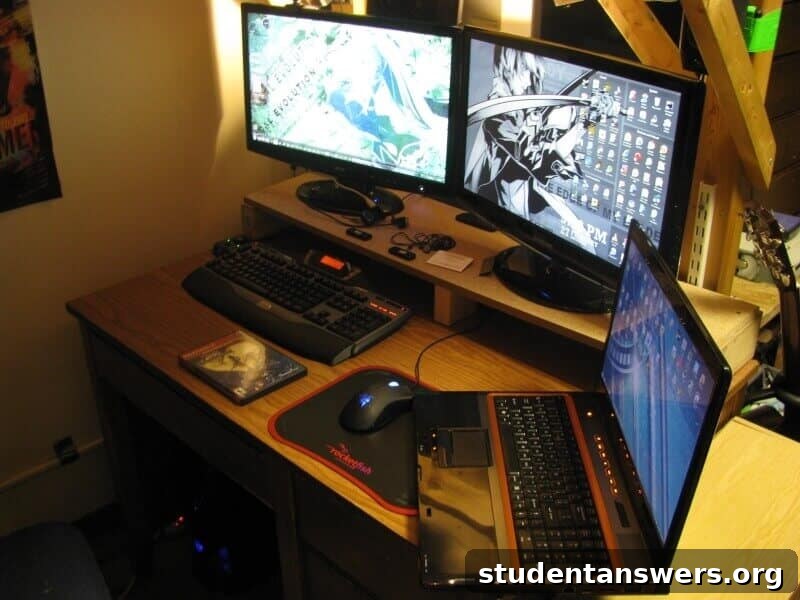
The single most transformative change I made was building a simple shelf for my monitors. This DIY monitor stand immediately unlocked a huge amount of previously unusable space. By elevating the screens, I created a “garage” underneath where my laptop and keyboard could be slid away when not in use. This simple act of going vertical instantly liberated nearly two-thirds of my desk surface.
This principle is crucial for any small workspace. When you can’t expand outwards, build upwards. A monitor stand or shelf does exactly that. It neatly contains your digital hub to one area, creating a clear and open surface for books, notebooks, and other study materials. You can build a simple one with a plank of wood and some short legs, or purchase an affordable pre-made stand online. The return on investment in terms of usable space is immense.
Step 2: Embrace the Productivity Paradox of a Second Monitor
It might sound counterintuitive to add more tech to solve a clutter problem, but adding a second monitor was a game-changer for my workflow. The key is how it changes your digital habits. With two screens, you drastically reduce the need to switch between windows. You can have your research article or textbook PDF open on one screen while you type your essay on the other. For coding, you can view your code on one side and the output or documentation on the other.
This efficiency means you’re less likely to need physical printouts or multiple notebooks open at once, which in turn reduces physical clutter. Your entire digital workflow becomes smoother and more contained. When placed on a monitor stand, two screens take up the same footprint as one large, cluttered area, but offer double the digital real estate. It’s a strategic addition that streamlines your process and helps keep your physical desk clear.
Step 3: Master Your Cable Management
A tangle of wires is the hidden enemy of a clean desk. It collects dust, looks chaotic, and makes it a nightmare to plug or unplug devices. Taming this “cable spaghetti” is a non-negotiable step for a truly organized space. Fortunately, it’s easier and cheaper than you think.
Here are some simple cable management solutions:
- Velcro Cable Ties: They are reusable and perfect for bundling groups of wires together, such as those running from your monitors or behind your PC.
- Cable Sleeves: A neoprene sleeve can zip up multiple cables into one clean, thick tube, making the run from your desk to the power outlet look intentional and tidy.
- Adhesive Cable Clips: These small clips stick to the back or underside of your desk, allowing you to route individual cables precisely where you want them to go, keeping them out of sight.
- Under-Desk Cable Tray: For the ultimate setup, a small metal basket that mounts under your desk can hold your power strip and all the excess cable slack, completely hiding it from view.
Spending just 30 minutes on cable management will make your workspace feel ten times cleaner and more professional.
Step 4: Define Your Zones
With the vertical space utilized and cables tamed, the final step is to create dedicated zones on your desk. This creates a mental map that helps you stay organized automatically.
- The Digital Zone: This is the area on and under your monitor stand. It’s home to your screens, keyboard, mouse, and laptop. When you’re doing computer work, you’re in this zone.
- The Analog Zone: This is the large, open space you’ve now created. It’s exclusively for non-digital tasks. When you need to read a textbook, sketch out a problem, or take notes, you use this clean-slate area.
- The Supply Zone: Keep your essential supplies (pens, highlighters, sticky notes) in a single, simple organizer or a designated drawer. This prevents them from scattering across your workspace.
By separating your desk into these functional areas, you prevent task-creep and maintain a sense of order.
The Transformation: Before and After
The difference was night and day. My desk went from a source of stress to a tool for success. The visual evidence speaks for itself.
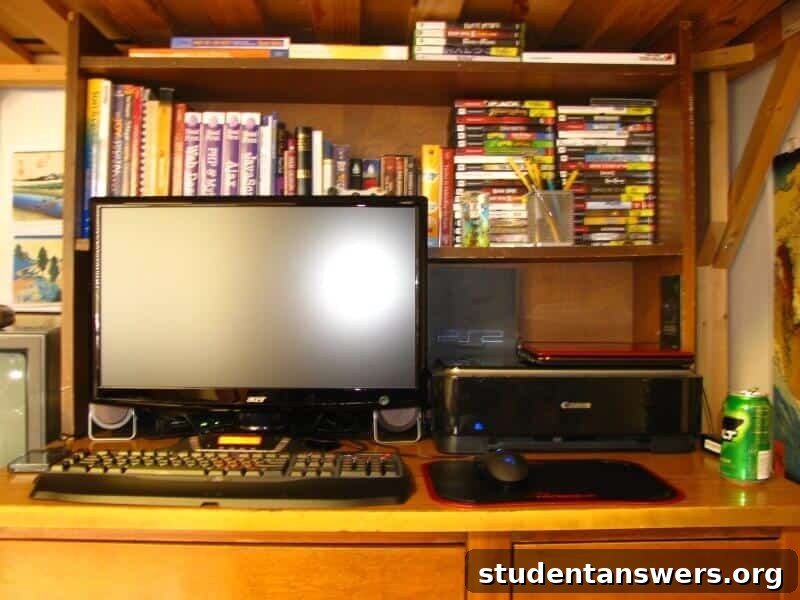
Before – The Cluttered Command Center
In the “before” shot, you can see the problem clearly. The entire desk surface is consumed by the computer and its accessories. There is no clear space for a book or notebook. This setup was inefficient and made switching between digital and physical tasks a chore.
After – The Streamlined Productivity Hub
The “after” photo showcases the power of strategic organization. The monitor shelf elevates the screens, creating a vast, open workspace. The keyboard and laptop can be tucked away, leaving a clean surface ready for any task. The space feels calmer, more intentional, and infinitely more functional.
Further Resources and Inspiration
Looking for more ideas? The internet is filled with amazing communities of people who are passionate about creating productive and beautiful workspaces. Here is a great place to start your search for inspiration:
- The LifeHacker Workspace Show & Tell on Flickr – A classic collection of user-submitted workspaces with tons of clever ideas.
- Check out subreddits like r/workspaces and r/battlestations for modern takes on desk organization and productivity setups.
How have you optimized your desk for college? What is the one organization hack that has transformed your study habits? Share your tips and experiences in the comments below!