

Unlock Your Academic Potential with a Bullet Journal

The Ultimate Guide to Bullet Journaling for Students: Boost Productivity and Get Organized
I’ve always been skeptical of new productivity systems. When a few friends started raving about the Bullet Journal (or “BuJo”), my first thought was, “Here we go again, another productivity trend that will fade in a month.” I had seen the elaborate, artistic spreads on Instagram and Pinterest—beautiful, but seemingly impractical for daily use.

Who has the time to create a masterpiece every single day? I quickly dismissed bullet journaling as something that just wasn’t for me, a system designed more for artists than for busy students needing a functional planner. I predicted my friends would give it up within weeks. And while they did, the Bullet Journal method itself didn’t disappear. In fact, it only grew more popular. I decided to find out why.
It turns out, the core of the Bullet Journal system is not about artistic flair; it’s about intentionality, focus, and flexibility. It’s a powerful tool that can help you cut through the noise of digital life and gain control over your schedule, tasks, and goals. This guide will walk you through exactly how to set up a functional Bullet Journal that works for your student life—no artistic skills required.
Why a Bullet Journal Is Your Secret Weapon Against Distraction
Before we dive into the “how,” let’s explore the “why.” In an age of endless apps and notifications, the biggest advantage of a paper journal is its simplicity. To begin, all you truly need is a notebook (a dotted notebook is popular for its flexibility) and a good pen (I’m a fan of Muji pens).
This analog system offers several key benefits:
- Enhanced Focus: When you open your notebook to check your schedule or add a task, there are no notifications, no social media feeds, and no clickbait articles vying for your attention. You simply find what you need and get back to your work. This single-tasking environment is a powerful antidote to the constant digital distractions that fragment our focus.
- Centralized Organization: Say goodbye to scattered sticky notes, multiple planner apps, and random digital documents. Your Bullet Journal becomes a single, reliable home for everything—class deadlines, project ideas, reading lists, lecture notes, and personal goals. Having it all in one place reduces mental clutter and the anxiety of forgetting something important.
* Mindful Prioritization: In a digital app, it’s easy to add endless tasks that just sit on a list. With a BuJo, you have to physically write down each task. If a task isn’t completed, you must consciously decide whether to rewrite it on a new day. This simple act of “migration” forces you to evaluate its true importance. If it’s not worth the effort to rewrite, was it ever worth doing? This process helps you filter out the non-essential and focus on what truly matters.
Now, let’s break down the simple yet powerful components that make this system work so effectively.
The Core of the System: Rapid Logging
The engine behind the Bullet Journal is a method called “Rapid Logging.” It’s a shorthand language that allows you to capture information quickly and efficiently. Instead of writing long sentences, you use simple symbols to categorize each entry, making your notes scannable and easy to review.
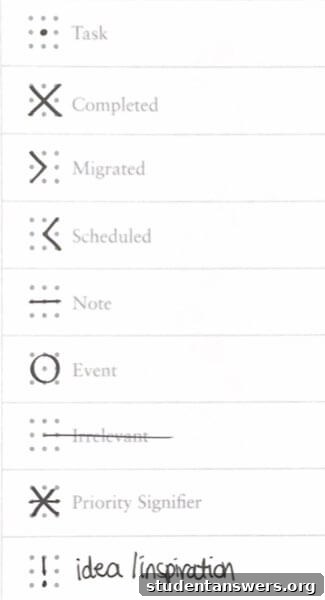
Here are the basic symbols you’ll use:
- • (Task): Represents something you need to do.
- X (Task Complete): You draw an “X” over the dot when the task is finished.
- > (Task Migrated): The task has been moved to a future date or a different list.
- < (Task Scheduled): The task has been scheduled in your Future Log.
- ◦ (Event): Represents appointments, deadlines, or significant occurrences.
- – (Note): For thoughts, ideas, observations, or any information you want to capture.
You can also add “Signifiers” for extra context. An asterisk (*) can mark a task as a priority, while an exclamation point (!) can highlight a great idea or inspiring note. These symbols come together in your daily entries.
The Daily Log: Your Day-to-Day Organizer
If you’re new to bullet journaling, the Daily Log is the best place to start. It’s a space to capture your tasks, events, and notes as they happen throughout the day. It’s messy, it’s functional, and it’s the heart of the system.

Here’s how to set up your Daily Log:
- Write the Date: Start by writing today’s date at the top of a fresh page. This serves as a simple header.
- Log Your Entries: As the day progresses, use Rapid Logging to jot down everything you need to remember. For example:
October 25, Wednesday
- • *Finish Chapter 5 reading for History 101
- ◦ Study group meeting at 3 PM – Library Room 4
- – Remember to ask Prof. Davis about the essay extension.
- • Email the project team about the new deadline.
- • Do laundry
- Update Your Log: At the end of the day, take a few minutes to review your entries. Mark completed tasks with an “X”. If a task wasn’t finished, you have a choice: cross it out if it’s no longer relevant, or “migrate” it. Use a “>” to signify you’re moving it to the next day’s log or another list in your journal.
This daily practice keeps you organized in the short term and ensures nothing falls through the cracks.
Structuring Your Journal with Collections
While the Daily Log handles the present, “Collections” are where you organize everything else. A Collection is simply any dedicated page or set of pages for related content. The core system relies on four essential Collections to keep you organized on a macro level.
1. The Index: Your Table of Contents
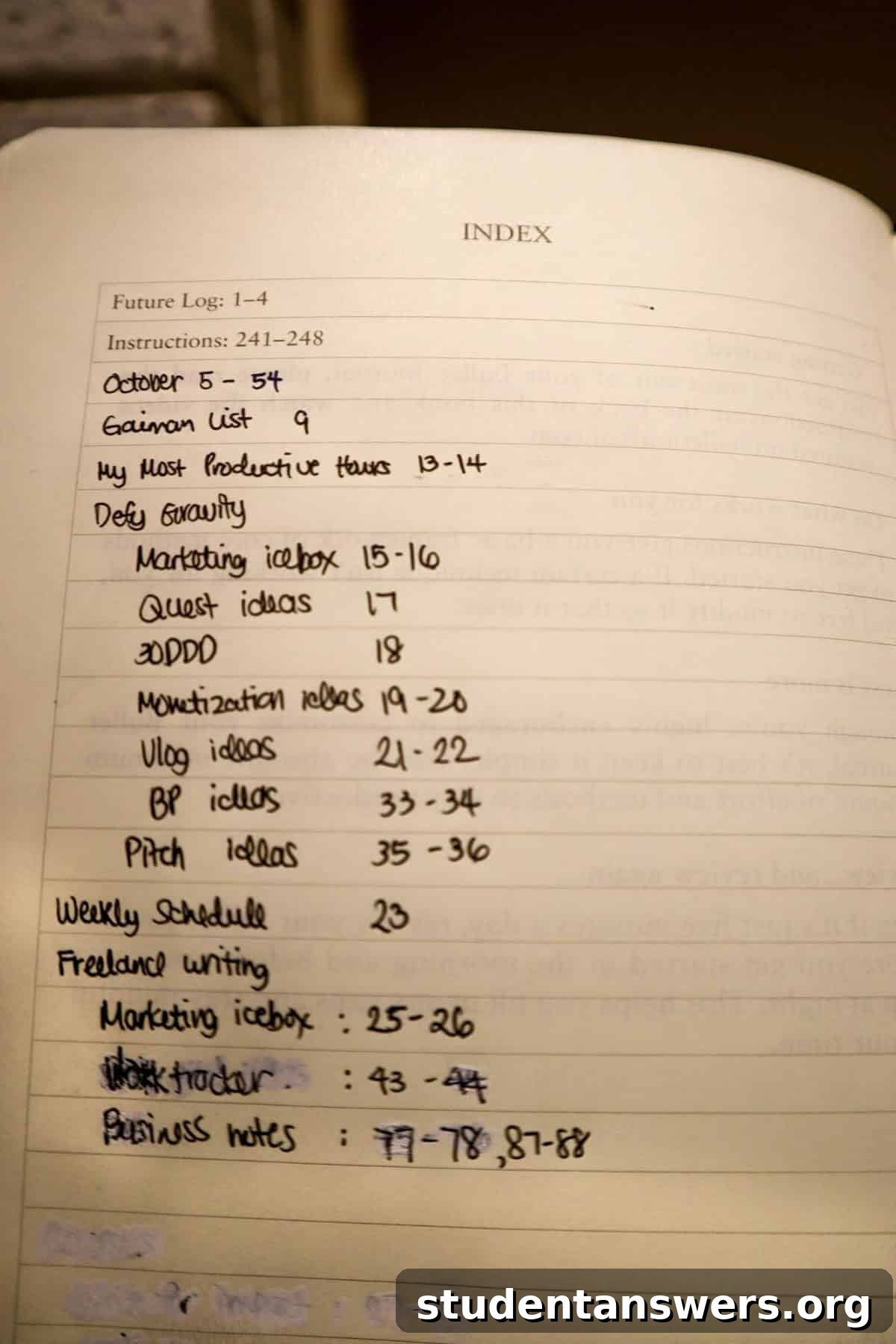
The first few pages of your notebook should be reserved for your Index. Just like a table of contents in a book, the Index is where you’ll list all your important Collections and their page numbers. Every time you start a new Collection—like a Monthly Log or a list of books to read—you add its title and page number to the Index. This makes finding anything in your journal quick and painless, no matter how full it gets.
2. The Future Log: Your Year at a Glance
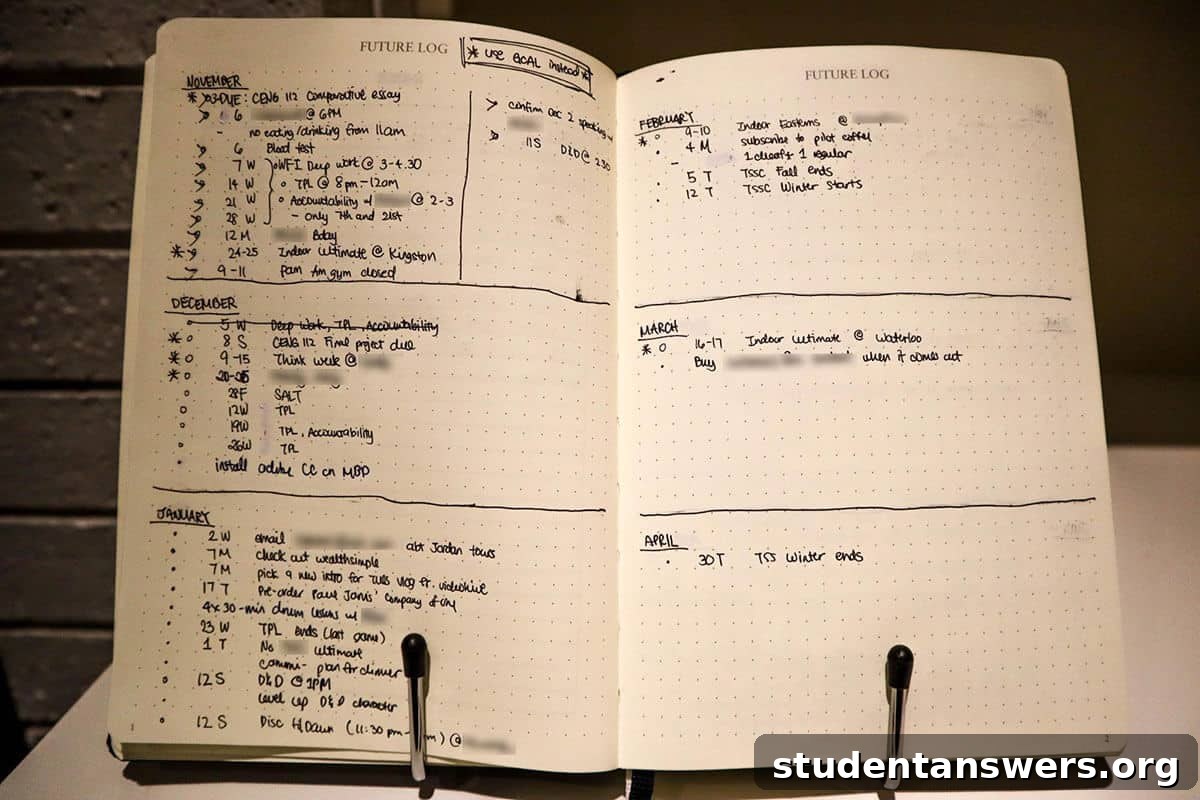
Following the Index, the Future Log is where you’ll capture tasks and events that are months away. Dedicate a few pages and divide them into sections for the upcoming 6 to 12 months. When you schedule a dentist appointment for three months from now or get the date for your final exams, you jot it down here. At the beginning of each new month, you’ll consult your Future Log to see what’s coming up.
3. The Monthly Log: Your Monthly Command Center
The Monthly Log provides a bird’s-eye view of the current month. It’s typically a two-page spread. On the left page, list all the dates of the month vertically, which is useful for scheduling events and deadlines. On the right page, create a task list for everything you want to accomplish that month. This is where you’ll migrate tasks from your Future Log and any larger goals you want to tackle.

4. Custom Collections: Tailor Your Journal to Your Life
This is where the Bullet Journal truly shines. You can create a Collection for absolutely anything. As a student, this is incredibly powerful. You can have Collections for:
- Class notes for a specific subject.
- A project plan for your term paper.
- A list of graduation requirements.
- A tracker for job or internship applications.
- A budget and expense tracker.
The possibilities are endless. Anytime you need a dedicated space for a specific topic, just turn to a new page, give it a title, and add it to your Index.
The Secret Sauce: Migration and Review
A Bullet Journal is not a “set it and forget it” system. Its effectiveness comes from the habit of regular review and migration. This is the process of moving unfinished tasks forward. The creator of the method, Ryder Carroll, recommends a brief morning and evening review.
- Morning Review: Look at your Monthly Log and select a few key tasks to focus on for the day, adding them to your Daily Log.
- Evening Review: Go through your Daily Log. Mark off what you’ve completed. For anything left undone, decide if it’s still important. If it is, migrate it (>) to tomorrow’s Daily Log or back to your Monthly Log. If not, strike it through.
At the end of each month, you perform a larger monthly migration. You’ll review all your logs, move any outstanding tasks into the new month’s spread, and set up your new Monthly Log by pulling items from your Future Log. This act of rewriting tasks forces you to be intentional. It’s a built-in filter that helps you shed unimportant commitments and focus your energy on what truly moves you toward your goals.
4 Essential BuJo Spreads for Academic Success
Now that you understand the framework, here are four custom collections specifically designed to help you thrive as a student.
1. The Semester Overview
Before the semester even begins, create a one-page spread with a mini-calendar for each month of the term. Go through all your syllabi and mark down every major deadline, exam date, and holiday. This gives you a high-level view of your busiest weeks, so you can plan ahead and avoid last-minute cramming.
2. Weekly Class Schedule
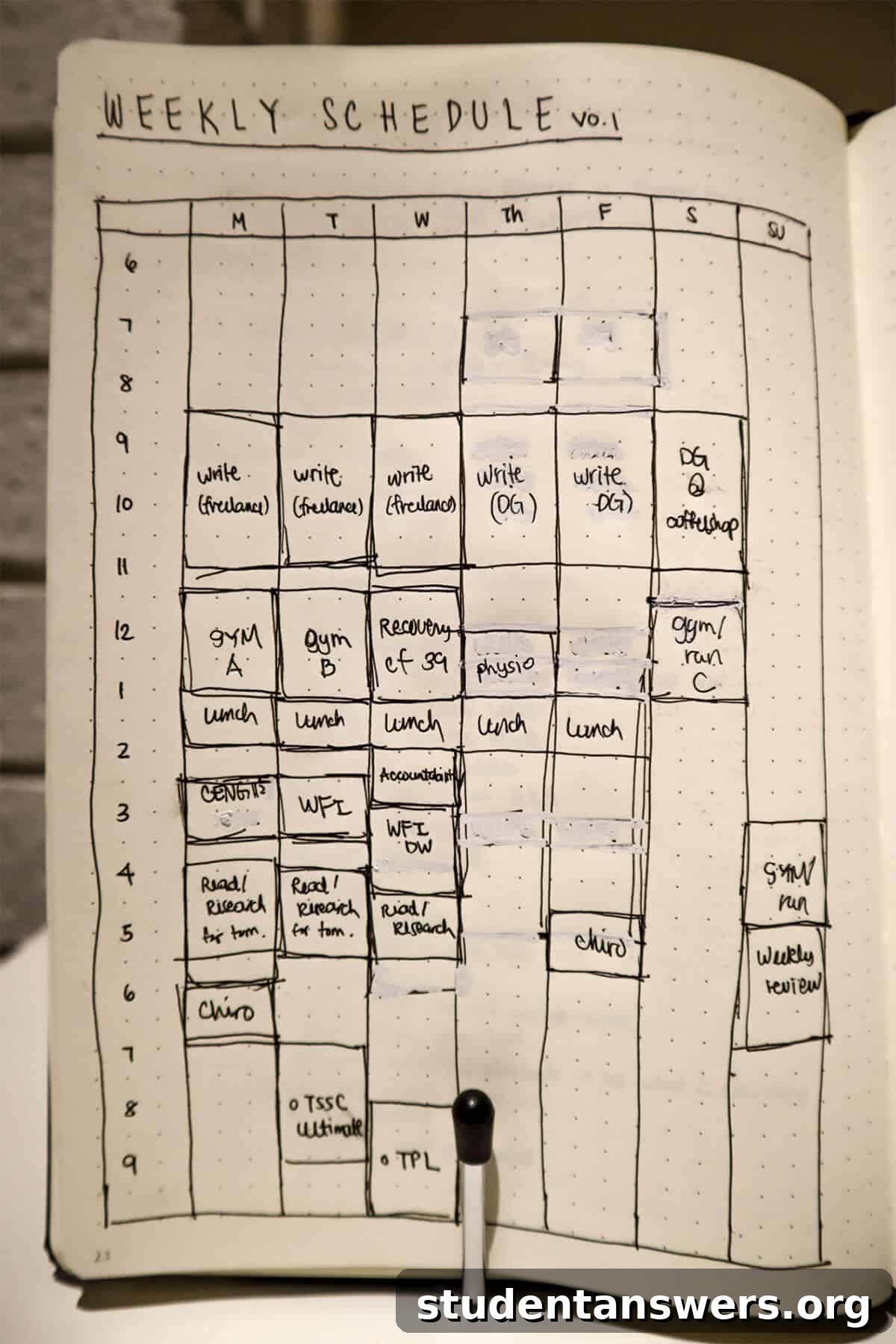
Create a simple grid showing your weekly schedule. Block out your class times, but also schedule your study blocks, gym sessions, and work hours. Having a visual template for your week helps you build a routine and manage your time more effectively. You can refer to this page when planning your days.
3. Assignment and Grade Tracker
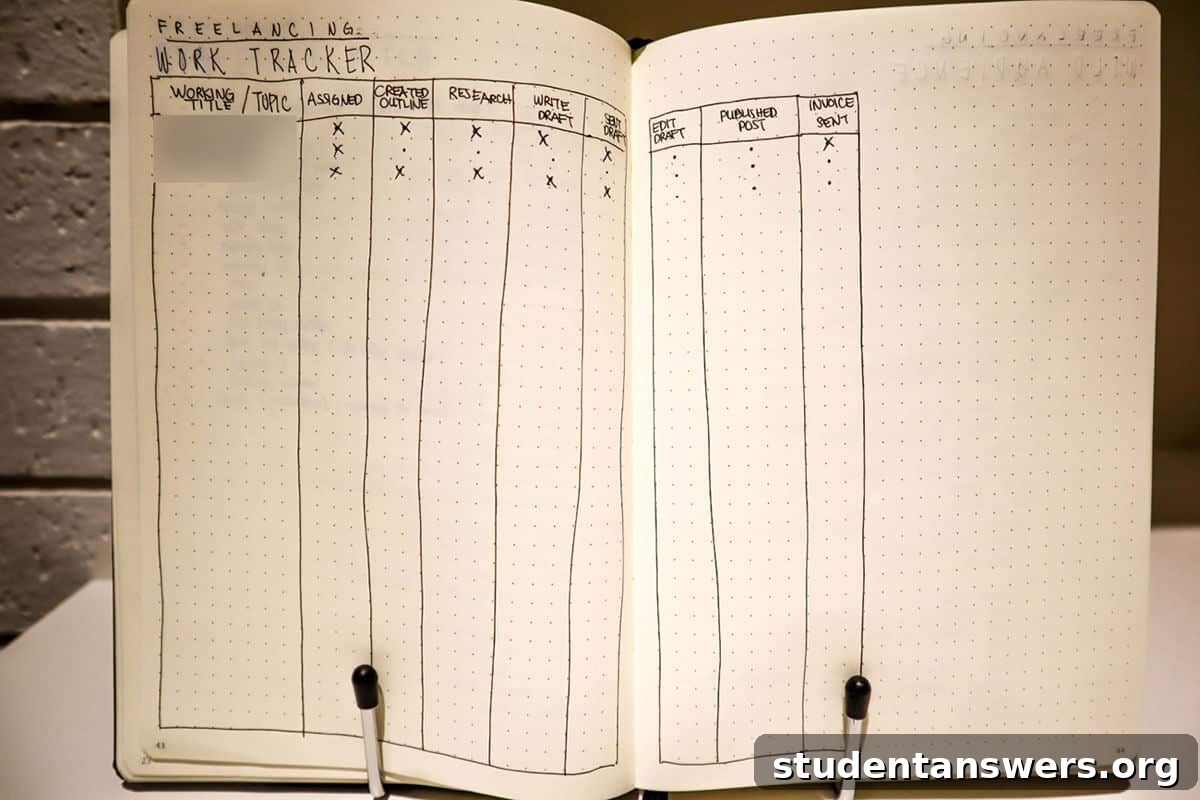
Dedicate a page or two for each class. Create columns to track every assignment, its due date, your submission date, and the grade you receive. This not only keeps you on top of your workload but also gives you a running tally of your performance, so there are no surprises at the end of the semester.
4. The Weekly Plan Spread
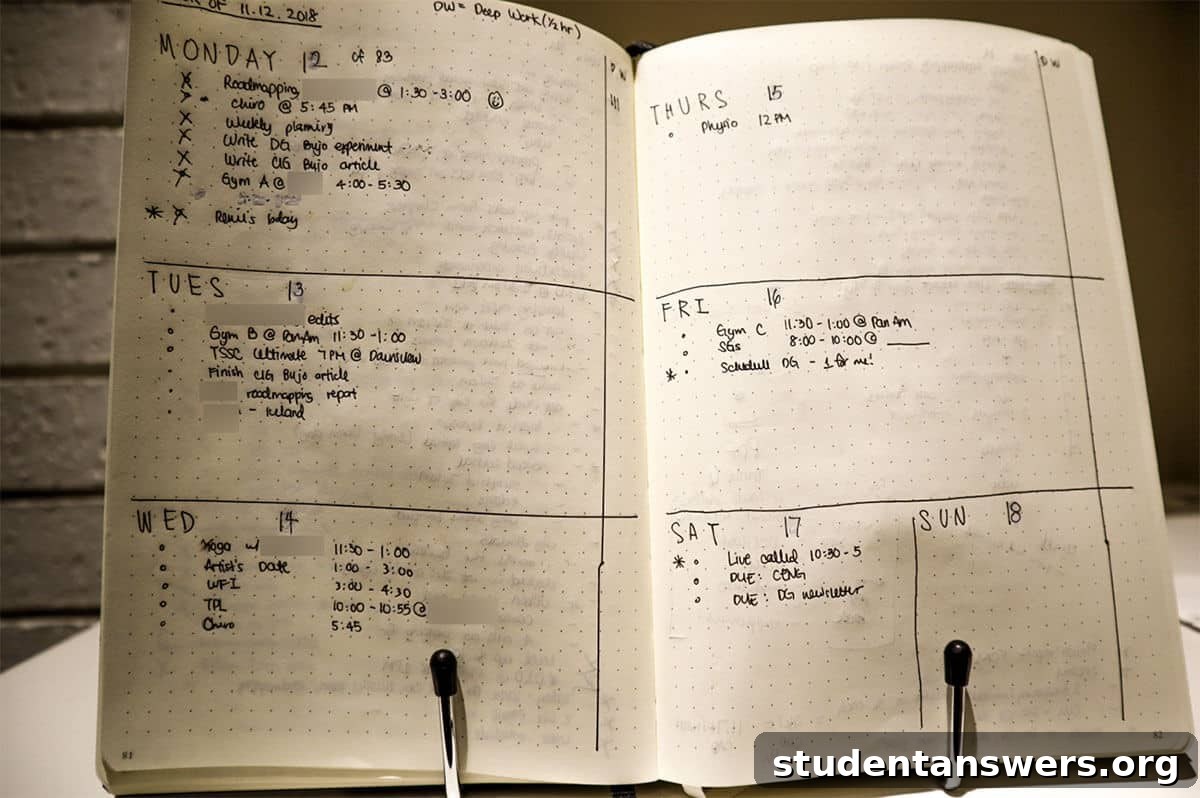
While the Monthly and Daily Logs are core BuJo components, a weekly spread can be a game-changer for students. Every Sunday, take 15 minutes to create a layout for the week ahead. List any appointments or deadlines for each day. Then, look at your Monthly Log and assign 2-3 priority tasks for each day. This breaks down big projects into manageable chunks and gives you a clear plan of attack for the week, reducing overwhelm and procrastination.
Will Bullet Journaling Really Make You More Productive?
Let’s be clear: an analog system like the Bullet Journal requires more manual effort than a digital app. You have to write things down, set up your own pages, and perform regular reviews. It takes consistent work to maintain.
But consider the trade-off. What if that small investment of time each day grants you a profound sense of calm and control? What if manually migrating a task makes you realize it was never a priority, saving you hours of wasted effort? What if having a distraction-free system allows you to enter a state of deep focus more often?
Productivity isn’t just about saving time or checking off the most tasks. It’s about directing your energy and attention to the right things. The Bullet Journal is more than a planner; it’s a practice in mindfulness and intentionality. It helps you clear your mind, organize your thoughts, and build a more focused and fulfilling academic life. That’s a benefit worth writing down.