

Harness Your Bodys Rhythm for Maximum Productivity

Unlock Your Peak Productivity: A Guide to Finding Your Biological Prime Time
What time of day do you feel unstoppable? When does your mind feel sharpest, and when do your best ideas seem to flow effortlessly?
If you’re an early riser, you might find your peak energy and focus align with the sunrise. The quiet morning hours could be your golden window for deep, meaningful work. On the other hand, you might be a night owl, feeling a surge of creativity at 1 A.M. while the rest of the world is asleep, tackling projects with unparalleled clarity.
Now, consider the opposite. When do you feel your worst? Do you experience that dreaded “afternoon slump” after lunch, where all you want is a power nap under your desk? Most of us have a vague sense of these daily rhythms, but what if you could move beyond guesswork and pinpoint with precision the exact hours of your peak performance?
Imagine having a detailed map of your daily energy fluctuations. With this knowledge, you could revolutionize your schedule. You could strategically assign your most challenging, intellectually demanding tasks to the times when your brain is naturally at its best.
This powerful concept is known as your “Biological Prime Time” (BPT). By identifying it, you can relegate meetings, errands, and administrative busywork to your lower-energy periods, ensuring your most valuable cognitive resources are never wasted on tasks you could do on autopilot.
For students, this insight is a game-changer for designing the perfect class schedule next semester. For professionals, it’s the key to structuring a workday that maximizes output and minimizes burnout.
The question is, how do you discover this personal productivity goldmine in a precise, data-driven way? The answer is surprisingly simple: you start tracking your energy levels. By treating your body like a scientific experiment, you can gather data, identify patterns, and unlock a new level of efficiency.
In his book The Productivity Project, author Chris Bailey did exactly this to discover his own Biological Prime Time. Inspired by his experiment, we’ve developed a streamlined system to help you do the same. We wanted a method that was:
- Fast and Effortless: Requiring no more than 10 seconds to log your energy level.
- Fully Automated: The system had to calculate averages and generate a visual graph for you.
- Completely Free: No expensive apps or subscriptions needed.
We built it ourselves, and now we’re sharing it with you. By consistently logging your energy level each hour for several days, this system will generate a clear, insightful graph of your personal energy cycle, looking something like this:
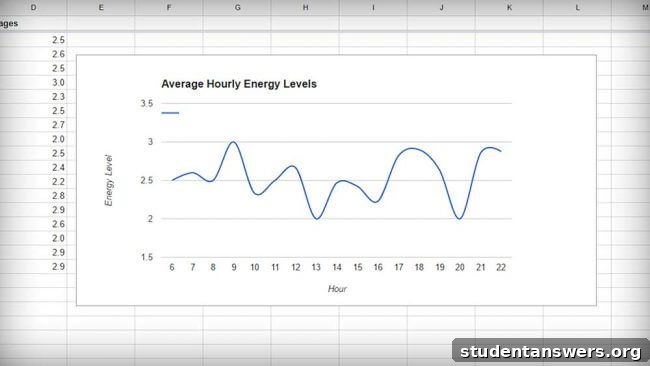
In this guide, we will walk you through the exact steps to set up your own energy tracking system. The hard part is already done. Follow along, and you’ll be on your way to discovering your Biological Prime Time.
How to Build Your Personal Energy Tracking System
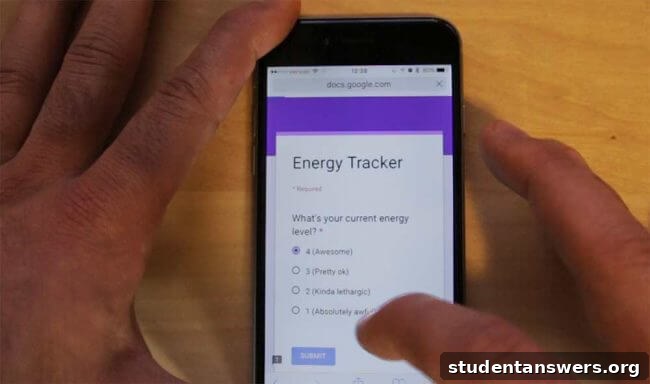
To create a seamless experiment, our system combines three powerful, free tools: Google Forms, Google Sheets, and an hourly reminder app on your phone. The goal is to make data entry incredibly easy and have the analysis happen automatically in the background. Since we’ve already built the complex spreadsheet for you, this entire setup process should take you less than 10 minutes.
Here’s a quick overview of the setup process:
- Make a personal copy of our pre-built Google Sheet template.
- Create a simple one-question Google Form to log your energy.
- Link your new form to your copy of the spreadsheet.
- Make two minor formula adjustments in the spreadsheet.
- Add a shortcut to your form on your smartphone’s home screen.
- Set up an hourly reminder to ensure consistent data collection.
Ready? Let’s begin.
Step 1: Copy the Google Sheet Template
The core of our system is a Google Sheet designed with specific formulas to automatically process the data you collect. Instead of building this from scratch, you can simply make a copy of the template we created.
First, click here to open the energy tracker template.
Once the sheet is open, navigate to the menu and click on File > Make a copy. You can name your new spreadsheet whatever you like, such as “My Energy Tracker.”
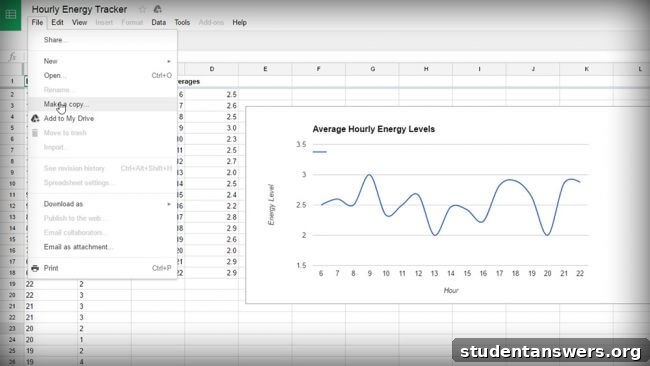
After creating your copy, a new browser tab will open with your personal spreadsheet.
Crucial First Step: Before you proceed, you must update the spreadsheet’s timezone. If you skip this, your timestamps will be incorrect, and the data will be useless. To do this, click File > Spreadsheet settings, select your current timezone from the dropdown menu, and click Save settings.
At the bottom of the spreadsheet, you will see two tabs: Results (Sample) and Responses (Sample). The “Responses” sheet is where raw data from the form is stored, and the “Results” sheet is where that data is processed and graphed. The sample data is just for demonstration.
The “Results” sheet uses a powerful function called `ARRAYFORMULA`. This is necessary because when Google Forms submits data, it inserts entirely new rows into the sheet, which would break simple cell references. `ARRAYFORMULA` allows the “Results” sheet to dynamically watch the “Responses” sheet and process all new entries automatically.
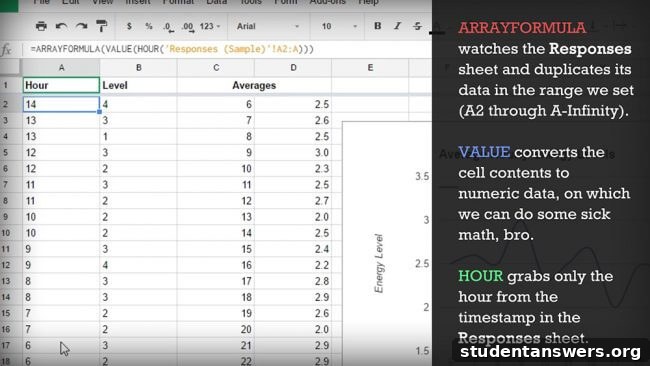
Now, let’s prepare your sheet for your own data. At the bottom, click the small arrow next to the Results (Sample) tab and choose Duplicate. Rename this new duplicated sheet to simply Results.
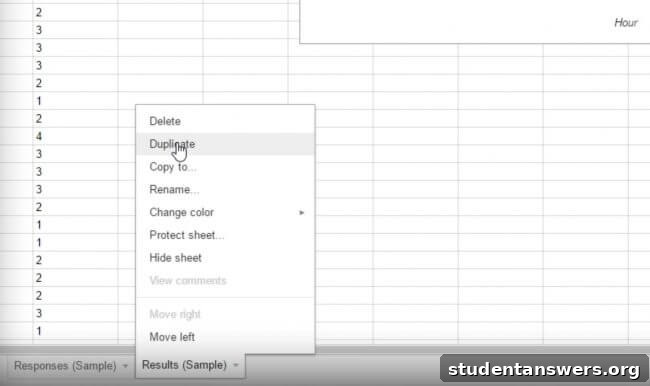
We’ll return to this sheet in a moment. First, let’s create the form you’ll use for data entry.
Step 2: Create Your Energy Logging Form
A Google Form provides an incredibly fast and simple interface for logging your energy levels throughout the day. The goal is to answer a single question multiple times a day with just a few taps.
Navigate to Google Forms and create a new blank form. Set it up as follows:
- Give your form a title, like “My Energy Tracker.”
- Add a multiple-choice question: “What is your current energy level?”
- Create your response options. We recommend a simple 1-5 scale to rate your energy.
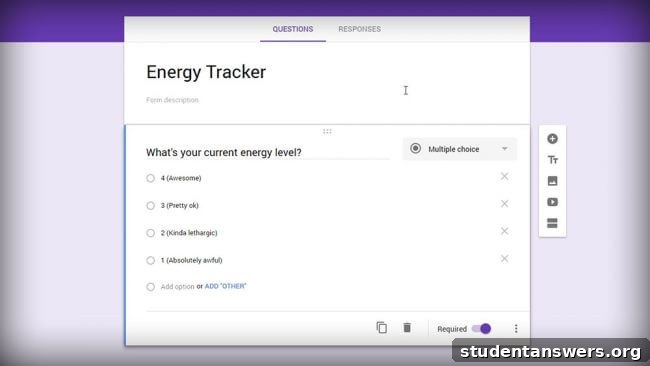
Important: The very first character of each answer option must be a number. Our spreadsheet formula is designed to extract this first character to calculate your average energy. For example, use “1 – Very Low” or “5 – Highly Energized.”
Next, make the question Required to prevent accidental empty submissions. Then, click on the Responses tab at the top of the form and click the green Google Sheets icon to link your form to a spreadsheet.
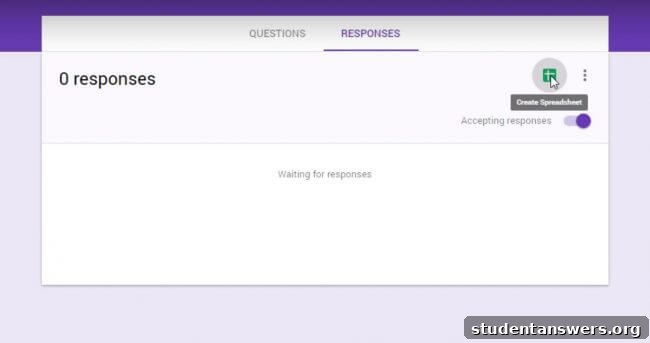
When prompted, choose Select existing spreadsheet and select the “My Energy Tracker” sheet you copied in the previous step.
Step 3: Finalize Your Spreadsheet Connection
After linking the form, your spreadsheet will open. You’ll notice a new sheet has appeared, likely named “Form Responses 1”. Click the arrow next to its name and rename it to Responses.
Now, go back to your Results sheet (the one you created by duplicating the sample). We need to make one final tweak. You must edit the formulas in cells A2 and B2 to pull data from your new “Responses” sheet instead of the sample one. Update them to look exactly like this:
- Cell A2 formula:
=ARRAYFORMULA(VALUE(HOUR('Responses'!A2:A))) - Cell B2 formula:
=ARRAYFORMULA(VALUE(LEFT('Responses'!B2:B,1)))
That’s it! The system is now fully configured. The formulas will automatically watch for new entries from A2 and B2 all the way down the sheet, so you can log as much data as you wish.
Step 4: Add the Form to Your Phone’s Home Screen
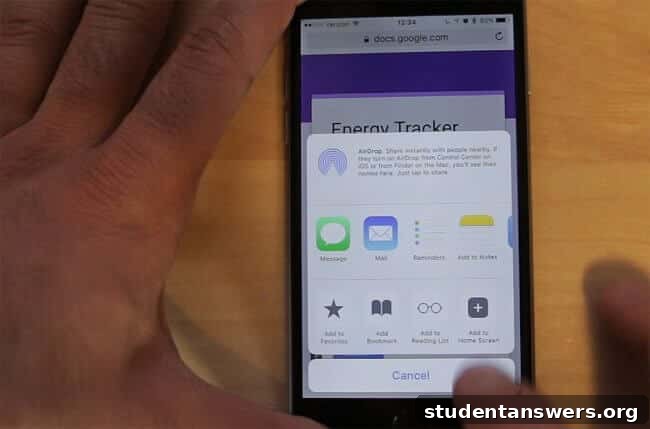
To make this process frictionless, you need one-tap access to your form. Go back to your Google Form editor and click the “Send” button in the top-right corner. Select the link tab and copy the form’s URL.
Open this link in the browser on your smartphone. You can email the link to yourself or use a tool like PushBullet to send it directly. Once the form is open, use your browser’s menu to “Add to Home Screen.” This will create an app-like icon that takes you directly to the form, making data entry take just a few seconds.
Step 5: Set Up Hourly Reminders
The biggest challenge in this experiment is remembering to log your energy consistently. To solve this, you need a reliable reminder system.
While you could set multiple alarms, a dedicated hourly chime app is more elegant. Here are some free recommendations:
- For iPhone: EveryHour is a simple app that plays a sound or vibrates on the hour. You can customize the time window so it doesn’t bother you while you sleep.
- For Android: Blip Blip offers similar functionality with extensive customization options.
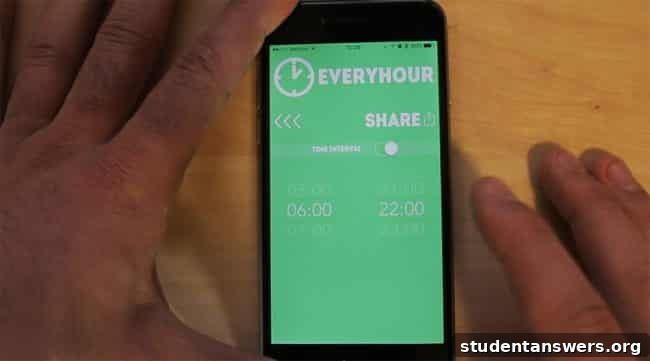
Set your chosen app to remind you every hour during your waking hours. This gentle nudge will help you build the habit of logging your energy levels consistently.
Now, Gather Your Data and Discover Your Prime Time!
With your system fully set up, the experiment begins. For the next one to three weeks, diligently log your energy level every hour within your chosen time window. The longer you track, the more accurate your average data will be, smoothing out any anomalies from a single bad night’s sleep or an unusually stressful day.
As you collect data, you can watch your graph in the “Results” sheet evolve. After a week or so, clear patterns should begin to emerge, revealing the natural peaks and troughs of your daily energy cycle.
Once you have a reliable graph, you’ll have a clear understanding of your Biological Prime Time. Use this invaluable knowledge to start making strategic changes to your schedule. Reserve your peak hours for your most important work, and watch your productivity soar. Happy tracking!
Images: Hippo, coder