

Unlock Your Androids True Potential With These Apps
Boost Your Productivity: The Essential Android Apps for Programmers and Developers
In today’s fast-paced world, your smartphone is more than just a communication device; it’s a powerful pocket-sized computer. For programmers, developers, and IT professionals, this means you can write code, manage servers, and solve problems from virtually anywhere. As a dedicated Android user, I’ve found that the platform’s open nature and vast ecosystem of applications make it an indispensable tool for my daily workflow. Gone are the days when serious development work was chained to a desktop. Now, with the right set of apps, your Android phone can become a formidable companion to your development setup.
Whether you’re a seasoned developer looking to stay productive on the go or a student just starting your coding journey, the Google Play Store is filled with gems that can transform how you work. This guide will explore the most essential Android apps for programmers, covering everything from powerful terminal emulators and code editors to handy reference guides and version control clients. We’ll move beyond the basics and dive into tools that genuinely enhance productivity, simplify complex tasks, and keep you connected to your projects, no matter where you are.
Why Android is a Developer’s Best Friend on the Go
While both major mobile operating systems offer a wealth of apps, Android possesses some unique advantages that make it particularly appealing to the technically inclined. Its foundation on the Linux kernel provides a familiar environment, and its open-source nature allows for a level of customization and control that is simply unmatched. Here’s why Android stands out as a superior platform for developers and programmers.
- True Multitasking and Flexibility: Android’s flexible operating system allows applications to run complex background processes, making it possible to compile code, run a local server, or download large repositories without having to keep the app in the foreground.
- Direct Filesystem Access: Unlike more restricted systems, Android provides robust file managers that allow you to access, modify, and organize your project files directly on your device. This is crucial for managing codebases, assets, and configuration files without needing a computer.
- Powerful Terminal Emulators: The ability to access a full-fledged Linux command line is a game-changer. Apps like Termux provide a complete Linux environment, allowing you to install packages, run scripts, and connect to remote servers using SSH.
- Unparalleled App Ecosystem: The Google Play Store, along with third-party repositories like F-Droid, offers an incredible variety of open-source and powerful tools specifically built for development, many of which are not available on other platforms.
Unleash the Power of Linux: Terminal Emulators and Command-Line Tools
For any developer working with servers, automation, or back-end systems, the command line is an essential tool. A good terminal emulator on your phone allows you to securely manage remote servers, run scripts, and perform administrative tasks from anywhere with an internet connection. It bridges the gap between your mobile device and your core infrastructure.
Termux: Your Pocket Linux Environment
Termux is arguably the most powerful and essential app for any programmer using Android. It is far more than a simple terminal emulator; it provides a comprehensive Linux environment right on your device without requiring root access. With its own robust package manager (based on APT), you can install and run a vast array of command-line tools you’re already familiar with from your desktop Linux distribution.
Key Features of Termux:
- Extensive Package Collection: Install popular programming languages like Python, Node.js, Ruby, and Go. You can also install essential tools like Git, curl, wget, and text editors like Vim and Emacs.
- Hardware Access: Termux provides APIs to access device hardware, such as the battery status, camera, and sensors, allowing you to write powerful automation scripts.
- Customizable and Extendable: You can customize the terminal’s appearance with themes and fonts and extend its functionality with various add-ons.
– Secure Shell (SSH) Access: Use the OpenSSH client included to securely connect to and manage your remote servers. You can generate SSH keys directly on your device for password-less authentication.
With Termux, you can pull a Git repository, make a quick code change with Vim, run a Python script to test an API, and SSH into your production server to restart a service—all from your phone while waiting in line for coffee.
Writing and Editing Code on the Move
While you might not write an entire enterprise application on your phone, a capable code editor is invaluable for making quick fixes, reviewing pull requests, or jotting down ideas. Modern mobile code editors have evolved significantly, offering features like syntax highlighting, code completion, and even integration with version control systems.
Acode: The Lightweight and Powerful Code Editor
Acode is a fantastic open-source code editor that strikes the perfect balance between a lightweight interface and powerful features. It supports syntax highlighting for over 100 programming languages, ensuring that your code is readable and easy to navigate. Its clean, tabbed interface makes it easy to work on multiple files simultaneously.
Why Acode Stands Out:
- GitHub and GitLab Integration: You can clone repositories, make commits, push changes, and manage your projects directly within the app. This is incredibly useful for participating in collaborative projects from your phone.
- Built-in Terminal: Acode includes an integrated terminal, allowing you to run commands and scripts without leaving the editor. This creates a more seamless development workflow.
- Extensive Customization: The editor is highly themable, with dozens of pre-built themes to choose from. You can also customize font sizes and other editor settings to suit your preferences.
- In-App Website Preview: For web developers, Acode offers a browser preview, so you can see your HTML, CSS, and JavaScript changes in real-time.
Quick References and Cheat Sheets
No programmer can remember every function, command, or piece of syntax for every language they use. That’s where reference apps and cheat sheets come in. Having quick access to documentation and syntax guides on your phone can save you countless trips to a search engine, streamlining your coding process and helping you learn new technologies more efficiently.
DevCheats: Your Go-To Syntax Companion
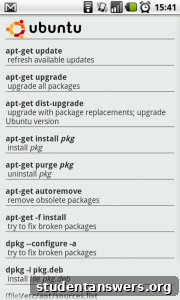
Inspired by the original idea of a simple, offline-first cheat sheet app, modern applications in this category aim to provide concise and searchable information for a wide range of programming languages and tools. While the specific “devcheats” app may have evolved, the concept is more relevant than ever. Look for apps that offer offline access to cheat sheets for languages like JavaScript, Python, SQL, and CSS, as well as for tools like Git, Docker, and various command-line utilities.
What to Look for in a Reference App:
- Offline Access: The most crucial feature is the ability to access information without an internet connection. This is perfect for when you’re commuting or in an area with poor connectivity.
- Broad Language Support: A good app should cover a wide array of popular and niche technologies, from front-end frameworks to back-end languages and database commands.
- Searchable and Well-Organized: Content should be easy to navigate with a powerful search function and logical categorization, so you can find what you need in seconds.
- Code Snippets: The best cheat sheets provide copy-and-paste-ready code examples for common tasks, which can be a huge time-saver.
Conclusion: Your Development Environment in Your Pocket
The days of being tethered to a desk for programming are over. The Android platform, with its robust and diverse application ecosystem, empowers developers to be productive in ways that were once unimaginable. By equipping your device with a powerful terminal like Termux, a versatile code editor like Acode, and a handy reference guide, you can create a mobile development environment that is both capable and convenient.
These tools allow you to manage servers, edit code, collaborate on projects, and look up critical information from anywhere in the world. As mobile hardware continues to advance and developers create even more innovative applications, the line between what can be done on a phone versus a laptop will only continue to blur. Embrace these tools, customize your mobile workflow, and unlock a new level of productivity and freedom in your programming journey.