

Elevate Your Workspace Finding the Perfect Standing Desk
The Ultimate Guide to Choosing the Best Standing Desk for Your Home Office
As remote work becomes the new standard for millions, the search for a healthier and more productive home office setup is on. Standing desks have emerged as a popular solution, offering an active alternative to the traditional sedentary workday spent at a desk or, more often than not, hunched over a laptop on the couch. With features like adjustable height, these desks allow you to seamlessly switch between sitting and standing, adapting to your body’s needs throughout the day.
However, navigating the world of standing desks can be a daunting task. With a vast array of options, features, and price points, how do you determine which one is the right fit for you? More importantly, are standing desks truly worth the investment? This comprehensive guide is designed to cut through the noise, answer your most pressing questions, and help you find the perfect standing desk for your space, budget, and work style.
4 Excellent Standing Desk Options for Every Budget
Choosing the right standing desk doesn’t have to be complicated. We’ve evaluated the market and selected our top four recommendations, each catering to different needs and financial considerations. From DIY solutions to premium electric models, here’s a breakdown of the best options available.
1. The No-Cost Solution: The DIY Standing Desk
Before you invest in a brand-new piece of furniture, consider that you might already have the components for a functional standing desk at home. A do-it-yourself setup is the perfect way to experiment with the concept of working on your feet without any financial commitment.
The simplest approach is to repurpose a tall piece of furniture. A kitchen counter, a high dresser, or a sturdy bookshelf can serve as an excellent temporary standing workspace. This allows you to gauge how you feel after standing for a few hours and decide if it’s a habit you want to pursue long-term.
If you choose the DIY route, achieving proper ergonomics is crucial to avoid strain. According to guidelines from the Mayo Clinic, your setup should ensure that:
- The top edge of your monitor is at or just below your eye level.
- Your upper arms hang relaxed and close to your body.
- Your wrists are straight, with your hands positioned at or slightly below elbow level.
This ergonomic alignment can be challenging with a laptop alone. We strongly recommend using a dedicated laptop stand to elevate the screen and a separate external keyboard and mouse to keep your hands at the correct height. If you don’t have a surface that’s tall enough, get creative. Sturdy items like stacks of books, old banker’s boxes, or even a simple wooden plank can be used to raise your workspace to the ideal height.
2. The Flexible Upgrade: A Standing Desk Converter
If a DIY solution feels too temporary but you’re not ready for a full-sized standing desk, a converter is an excellent middle ground. These devices sit on top of your existing desk, transforming it into a sit-stand workstation. This allows you to keep the desk you already own while gaining the benefits of height adjustability.
While some converters are complex and expensive, a simple and affordable model often provides the best value. Our top recommendation in this category is the Executive Office Solutions Standing Desk Converter. It’s budget-friendly, highly adjustable, and lightweight enough to be easily stored when not in use. It gives you far more control than a typical DIY setup and is perfect for laptop users who want to switch between sitting and standing throughout the day. While it lacks a dedicated tray for an external keyboard, you can easily place one on your main desk surface, provided you can elevate your monitor to the correct eye level.
3. The Best Value Full Desk: IKEA SKARSTA Sit/Stand Desk
For those ready to commit to a dedicated sit-stand desk without breaking the bank, the IKEA SKARSTA Sit/Stand Desk is a standout choice. This desk offers a spacious work surface and a reliable mechanism for height adjustment at an accessible price point.
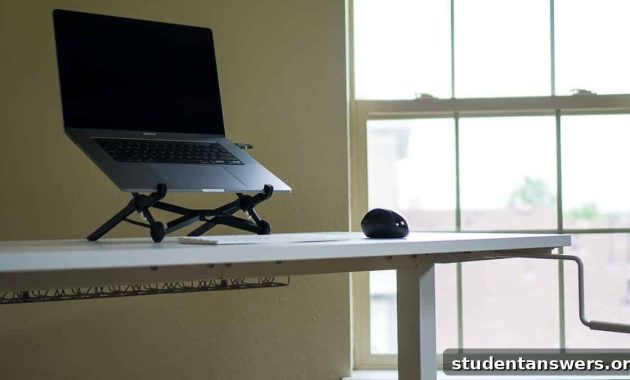
Instead of an electric motor, the SKARSTA uses a manual hand crank to raise and lower the desktop. While this requires a small amount of physical effort, it comes with significant advantages. There are no electronics to malfunction, no need for a power outlet, and the operation is completely silent. The simple, robust design ensures long-term durability, and the act of cranking the handle provides a nice, brief movement break when you transition between postures. The crank itself conveniently slides under the desk, staying out of your way until you need it.
4. The Premium Experience: The Jarvis Standing Desk
If you’re looking for the ultimate in convenience, customization, and performance, the Jarvis Standing Desk from Fully is our top recommendation. This electronically adjustable desk offers a premium experience with a powerful motor that smoothly and quietly transitions between heights at the push of a button.
The Jarvis desk excels in its level of personalization. You can choose from a wide variety of sizes, desktop materials, finishes, and colors to perfectly match your office aesthetic. It’s available in compact models ideal for a small bedroom corner, as well as expansive versions that can easily accommodate dual monitors and other professional gear.
One of its most popular upgrades is the programmable height control panel. This feature allows you to save your preferred sitting and standing heights as presets, so you can switch between them with a single touch. While the standard up-and-down controls are perfectly functional, the memory presets add a layer of effortless convenience that many users appreciate.
Beyond the controls, Fully offers a host of other customizations and accessories, including:
- Integrated keyboard trays
- Advanced cable management solutions
- Monitor arms for perfect screen positioning
- A wide range of desk organizers and trays
The Jarvis desk is an investment in your workspace, providing a stable, stylish, and highly functional foundation for a productive and ergonomic home office.
Essential Accessories for Your Standing Desk Setup
A standing desk is a great start, but a few key accessories can elevate your setup from good to great. These additions are designed to improve ergonomics, enhance comfort, and help you get the most out of your new workspace.
Laptop Stand
To avoid neck and shoulder strain, your laptop screen should be at eye level. A laptop stand is the easiest way to achieve this. We recommend the Roost Laptop Stand for its exceptional durability, portability, and adjustable design. It’s a worthwhile investment for anyone who works primarily on a laptop.
External Keyboard and Mouse
Once your laptop is on a stand, an external keyboard and mouse become essential for maintaining proper wrist and arm posture. A comfortable keyboard, like the popular Logitech K380 Bluetooth Keyboard, makes typing for long periods much more pleasant. Similarly, an external mouse offers superior precision and comfort compared to a trackpad. A simple option from Logitech is great for most users, while a quality mousepad will ensure smooth tracking.
Anti-Fatigue Mat
Standing on a hard floor for extended periods can lead to foot, leg, and lower back pain. An anti-fatigue mat is designed to combat this. These cushioned mats encourage subtle micro-movements in your leg muscles, which improves blood flow and reduces soreness. The Topo Anti-Fatigue Mat is a fan favorite due to its unique, varied terrain that encourages you to shift your stance. However, even a thick yoga mat can provide some relief.
Balance Board
As an alternative to a mat, a balance board introduces a more active element to your standing routine. It forces you to constantly engage your core and leg muscles to maintain stability, effectively turning your work time into a light workout. This not only prevents pain from static standing but also improves balance and strengthens stabilizer muscles. The FluidStance is a high-quality board designed specifically for use at a standing desk.
Do You Really Need a Standing Desk? The Hype vs. Reality
With their rising popularity, it’s fair to ask: are standing desks just a trend, or do they offer real health benefits? While it seems intuitive that standing is better than sitting, the science reveals a more nuanced picture.
A 2016 study found that standing at work burns only about 8 more calories per hour than sitting. For comparison, a brisk walk burns over 200 calories per hour. Therefore, a standing desk is not a substitute for regular exercise. Its true value lies elsewhere.
The primary benefit of a standing desk is that it encourages movement and postural variety. When you’re already on your feet, you’re more likely to stretch, shift your weight, or take a quick walking break. This variety is key to combating the negative effects of a sedentary job. Many users also report increased energy levels and find it helps them power through the common afternoon slump. Before you buy, try a DIY setup for a week to see if it works for you.
How to Create a Healthy Workspace, Desk or Not
A standing desk is a tool, not a magic solution. Whether you choose to sit, stand, or a combination of both, the following principles are essential for a healthy and pain-free work life.
Focus on Proper Ergonomics
Whether sitting or standing, arrange your workspace to minimize physical strain. For a sitting setup, the Mayo Clinic advises ensuring your feet are flat on the floor with your thighs parallel to the ground. Your monitor should be an arm’s length away, with the top of the screen at or just below eye level. This prevents you from hunching your neck and straining your eyes.
Take Frequent Movement Breaks
The real danger isn’t sitting itself, but sitting for prolonged, uninterrupted periods. Your body is designed to move. Set a timer to remind yourself to get up and move for a few minutes every hour. Walk around, do some simple stretches, or perform a few bodyweight exercises like squats or push-ups. The goal is to break up long periods of static posture.
Incorporate Flexibility and Strength Training
Regular physical activity outside of work is crucial. Focus on flexibility training, like yoga or targeted stretches, to counteract the tightness that can develop from sitting. Strengthening your core muscles is also vital, as a strong core provides support for your spine and helps prevent lower back pain. Activities like rock climbing, swimming, or weight training build overall strength and resilience against repetitive strain injuries.
Begin Your Journey to a Healthier Workday
We hope this guide has provided you with the clarity needed to choose the right standing desk. To summarize, here are our top recommendations based on your budget and needs:
- DIY Standing Desk: The best way to start for free.
- Executive Solutions Standing Desk Converter: A flexible and affordable upgrade.
- IKEA SKARSTA Sit/Stand Desk: The best value for a full, manually-adjustable desk.
- Jarvis Standing Desk: The premium choice for customization and electronic convenience.
Remember, a standing desk is most effective when combined with an ergonomic setup, regular movement breaks, and a commitment to overall fitness. By adopting these healthy habits, you can create a workspace that supports both your productivity and your well-being for years to come.