

Unlocking Productivity With a Strategic Calendar

Stepping onto a college campus for the first time is a whirlwind of new classes, new people, and new responsibilities. I learned almost immediately that the single most critical tool in my academic survival kit wasn’t a fancy notebook or a high-powered laptop; it was my calendar. It became the bedrock of my entire organizational system, the one thing standing between me and complete chaos.
Suddenly, my schedule was a complex web of classes, part-time job shifts, club meetings, social events, and study groups. The strategy that had barely worked in high school—simply telling myself, “I’ll remember it”—was laughably inadequate. That old habit had already led to at least one deeply embarrassing moment, like showing up to a formal honors society ceremony in cargo shorts while everyone else was in suits and dresses. A classic “whoops” moment I was determined not to repeat.
To avoid future fashion faux pas and, more importantly, to stay on top of my commitments, I had to master Google Calendar. It has since become an indispensable part of my daily life, evolving with me from my student years to my professional career. In this comprehensive guide, I’ll walk you through exactly how to harness the power of Google Calendar to organize your life, whether you’re a student juggling a dozen commitments or a professional managing your own time. While I focus on Google Calendar, the principles and strategies here are universal and can be applied to almost any digital calendar app.
Why Your Calendar Is a Key Part of Your Productivity System
Before we dive into the specific setups and features, it’s crucial to understand where a calendar fits into a larger productivity framework. For me, Google Calendar is a cornerstone of my quick capture system. So, what exactly is a quick capture system?
It’s not a secret agent gadget, but a simple, powerful concept: a collection of trusted tools designed to get ideas, tasks, and appointments out of your head and into a reliable external system as fast as possible. The core philosophy is this:
Your brain is for having ideas, not for holding them. A reliable external system frees up your mental energy for creativity, problem-solving, and deep focus.
When you try to store everything in your memory—that project deadline, your dentist appointment, a brilliant idea for an essay—you create constant, low-level anxiety. You’re always worried you’ll forget something. A quick capture system eliminates that anxiety by giving every piece of information a designated home.
The most important characteristic of any tool in this system is context. Each app should serve a specific purpose and exclude irrelevant information. Imagine if you wrote every thought, task, phone number, and grocery list item on individual sticky notes and threw them all into a giant box. Finding the note about your upcoming calculus exam would be nearly impossible. This is why it’s vital to separate different types of information, which brings me to a critical rule for calendar management.
Your Calendar Is for Events, Not a To-Do List
In my early days of trying to get organized, I made a common mistake: I crammed everything onto my calendar. Homework assignments, errands, reminders to call my mom—if it was something I needed to do, it went on the calendar. My thinking was that since I trusted my calendar more than any other tool, putting everything there would ensure it all got done.
I often let my to-do list apps become cluttered with overdue tasks until they were too overwhelming to look at. However, by moving my tasks to the calendar, I wasn’t solving the underlying problem of task management. I was simply diluting the power of the one system that was actually working. My calendar became cluttered and noisy, making it harder to see my actual, time-sensitive commitments.
Today, my approach is completely different. I maintain a strict separation. My tasks live in a dedicated task manager (I currently use Todoist), and my calendar is reserved exclusively for items that have a specific date and time attached to them. My guiding principle is:
An item only goes on the calendar if there is a compelling, external reason for it to happen at a specific time on a specific day.
A class lecture, a doctor’s appointment, a meeting with a professor, or a concert are all “hard landscape” events. They are fixed points in your schedule. A task like “write history paper” or “do laundry” is a “soft landscape” item. It needs to get done, but the exact timing is flexible. This distinction is the key to an effective and clean calendar.
A Step-by-Step Guide to Using Google Calendar as a Student
College life is defined by structure. Your days are packed with commitments that you don’t control. My calendar was my lifeline, and I optimized it for clarity and quick comprehension. The most effective technique I used was creating multiple, color-coded calendars for different areas of my life.
Here’s a breakdown of the separate calendars I created:
- Classes: This was for my fixed academic schedule. I’d input my entire semester’s schedule, including the class name, professor, and building/room number.
- Work: My first on-campus job had a chaotic scheduling system where we had to claim open hours each week. This calendar was essential for tracking my ever-changing shifts.
- Exams & Major Deadlines: A separate, brightly colored calendar for exams and major project due dates. This made them stand out, so I could see them coming weeks in advance.
- Extracurriculars: All my club meetings, volunteer activities, and on-campus events went here.
- Appointments: This was for one-off meetings, like appointments with clients for freelance work or group project meetings.
- Personal: A catch-all for things like meals with friends, workouts, and other personal commitments.
This multi-calendar structure made my schedule incredibly easy to read at a glance:
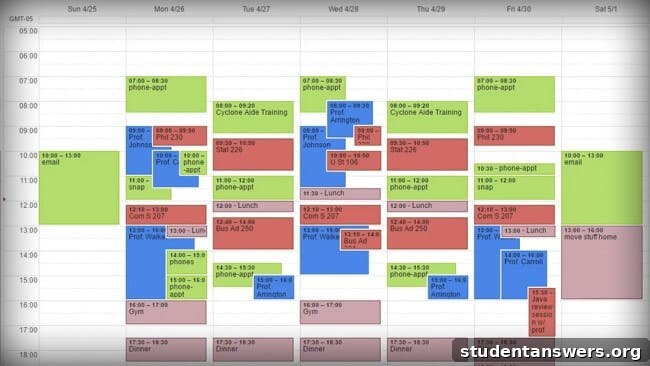
I also maintained a special, “hidden” calendar for professors’ office hours. At the beginning of each semester, I would input the office hours for every professor from their syllabus and keep this calendar turned off by default. Whenever I needed to see a professor, I could simply toggle the calendar on and instantly see their availability without cluttering my main view.
The primary advantage of this system is the power of color-coding. While Google Calendar now allows you to assign colors to individual events, using separate calendars still provides a better organizational framework. It allows you to toggle entire categories of your life on and off, which is perfect for focusing. If you want to learn how to create additional calendars, you can follow Google’s official instructions.
How My Calendar Strategy Evolved After College
As an entrepreneur, my schedule is vastly different from my college days. Most of my days are no longer dictated by a series of pre-scheduled events. Instead, my time is my own to manage, filled with creative work like writing, filming, and podcasting. These are tasks that need to be done, but I have flexibility on when I do them.
As a result, my calendar looks much more open and sparse now:
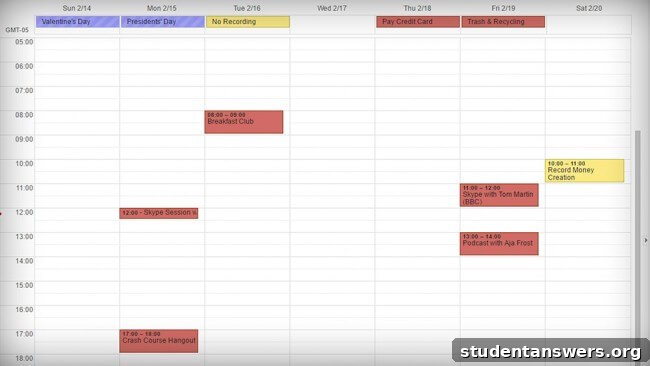
Despite having fewer entries, my calendar is arguably more important than ever. With long stretches of unstructured time, it would be dangerously easy to get lost in a single project for hours and completely forget a scheduled meeting. To prevent this, checking my calendar is one of the very first things I do as part of my morning routine. This daily check-in ensures there are no surprises.
My calendar entries today typically fall into one of these categories:
- Collaborations: Recording podcast episodes with my co-host or appearing as a guest on other shows. These are fixed appointments that I can’t miss.
- Meetings: Virtual calls or in-person meetings with partners, clients, or collaborators.
- Travel: I travel frequently, and it’s easy for trips to blur together. I create all-day events for my travel days to block them out. Most airlines and booking services also integrate with Google Calendar, automatically adding flight details.
- Fixed Personal Commitments: Some personal activities happen at set times, like a weekly yoga class or specific hours at the ice rink for figure skating practice. These earn a spot on the calendar.
Essential Apps and Tools to Supercharge Your Calendar
While Google Calendar is powerful on its own, a few key tools can enhance its functionality and make scheduling even more seamless.
For mobile use, your phone’s default calendar app is likely sufficient. However, I prefer using a third-party app called Fantastical. While it’s a paid app, I find it worth the cost for two main reasons:
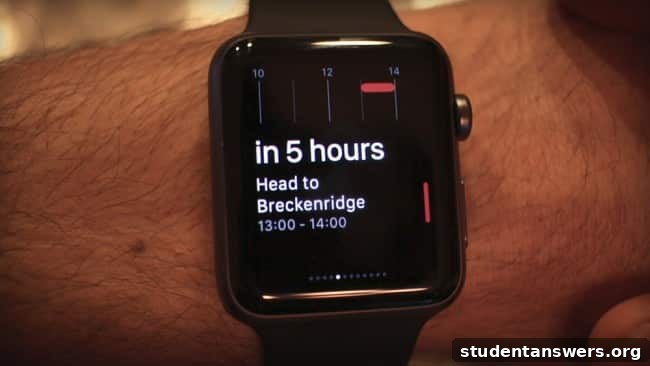
- Superior Apple Watch Integration: It offers a Glance view on the Apple Watch, allowing me to swipe up and instantly see details about my next appointment.
- Incredible Natural Language Processing: This is its killer feature. I can simply speak a sentence like, “Team meeting at the coffee shop on Tuesday at 2 PM,” and Fantastical automatically parses the information and creates the event correctly. It’s fast, intuitive, and highly accurate.
Of course, the official Google Calendar mobile app is also excellent and a great free alternative, especially for Android users where it comes pre-installed.
The other major challenge is scheduling events with other people, which often leads to an endless game of email tag. Thankfully, technology has solved this problem:
- Calendly: This tool is a game-changer for scheduling one-on-one meetings. You simply set your availability and share a link. The other person can then pick a time that works for them, and the event is automatically added to both of your calendars. It’s professional and incredibly efficient.
- Google Calendar’s “Find a Time” Feature: If everyone in your group uses Google Calendar and shares their availability, this built-in feature can work well to find a common free slot. However, this is rarely the case, especially in a college setting.
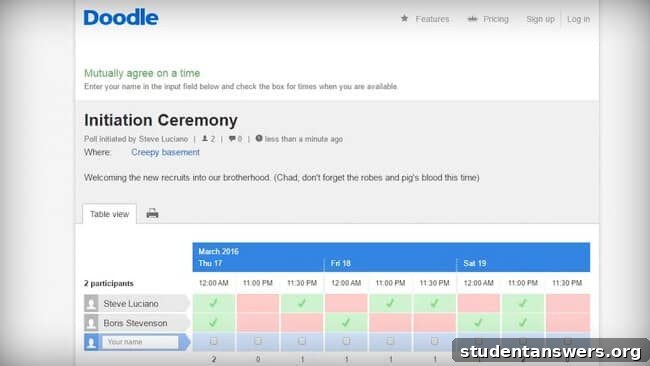
- Doodle: This was my go-to tool in college for scheduling group meetings. You create a poll with a selection of potential dates and times and send the link to your group. Everyone marks their availability, and Doodle shows you the best times to meet at a glance. It’s simple, free, and universally compatible.
By adopting these strategies and tools, you can transform your calendar from a simple datebook into a powerful command center for your life. You’ll reduce stress, avoid missed deadlines, and free up the mental space you need to focus on what truly matters.