

I once lived in a state of constant, chaotic disorganization. Throughout high school, my backpack was a black hole of crumpled assignments, broken pens, and forgotten snack crumbs. While my grades didn’t suffer, my peace of mind certainly did. It wasn’t until college that I discovered the power of a structured system, a revelation that transformed my approach to both my studies and my life. I’m still not a minimalist guru, but I’ve moved from “hopelessly messy” to “dependably organized.”
This comprehensive guide will walk you through the essential steps to not only get organized in college but, more importantly, to stay organized for the entire semester and beyond. Building the system is the easy part; maintaining it is where the real magic happens. So, open your favorite calendar app, grab your notebook, and let’s build a foundation for a more productive and stress-free college experience.
Why Getting Organized in College Is a Game-Changer
“Your brain is for having ideas, not storing them.” — David Allen, Getting Things Done
During my college years, I knew countless brilliant students who were perpetually exhausted. They survived on caffeine, pulled all-nighters regularly, and seemed to operate in a constant state of low-level panic. It’s easy to assume this was just the price of a challenging course load or too many extracurriculars. While that was sometimes a factor, the more common culprit was a profound lack of organization.
These students were smart enough to succeed despite the chaos. They could absorb information in class and cram effectively for exams. However, their overall quality of life was significantly diminished. This brings us to the single most important reason to embrace organization: it dramatically reduces your stress levels.
When you’re not constantly worried about forgetting a deadline or misplacing your notes, you free up immense mental energy. A lower stress level leads to better academic performance, improved well-being, and more available time for hobbies, friends, and relaxation. You become a more present student and a more enjoyable person to be around.
It’s important to note that organization itself doesn’t automatically boost your GPA. You still need to attend class, study the material, take effective notes, and complete your assignments. However, a solid organizational system gives you the time and mental clarity to do all those things effectively, rather than scrambling in panic mode and feeling like you’re always one step behind.
The 5 Pillars of a Rock-Solid College Organization System
Now that you understand the “why,” let’s dive into the “how.” By mastering the following five key areas, you can build a robust system that will serve you well throughout your academic journey. Whether you’re starting a new semester or trying to get on track midway through, these principles are universally applicable.
1. Master Your Schedule with a Calendar
If there is one productivity tool that every student must use, it’s a calendar. It is the foundation of any organized life. A calendar acts as your external brain, freeing you from the mental burden of remembering every class, appointment, and deadline. Instead of relying on sticky notes or flawed memory, you can visualize your commitments and plan accordingly. A digital calendar adds the benefit of automated reminders, ensuring nothing important ever sneaks up on you.
The specific tool you use is less important than your commitment to it. We’re partial to Google Calendar for its simplicity and integration, but any digital calendar app or even a physical paper planner can work wonders. The key is to use it consistently.
To start, perform a “brain dump” of every important date and commitment for the semester. Add the following to your calendar:
- All of your class times and locations (set these as recurring events)
- Major due dates for exams, papers, and projects from your syllabi
- Scheduled workout times
- Meetings with professors, TAs, or study groups
- Club meetings and extracurricular activities
- Important personal dates like move-in/move-out days
- Your work schedule if you have a part-time job
- Bill payment due dates (rent, credit cards, etc.)
A Real-World Calendar Example
Once you’ve gathered all this information, it’s time to populate your calendar. Here’s what a typical week looked like for me during my senior year:
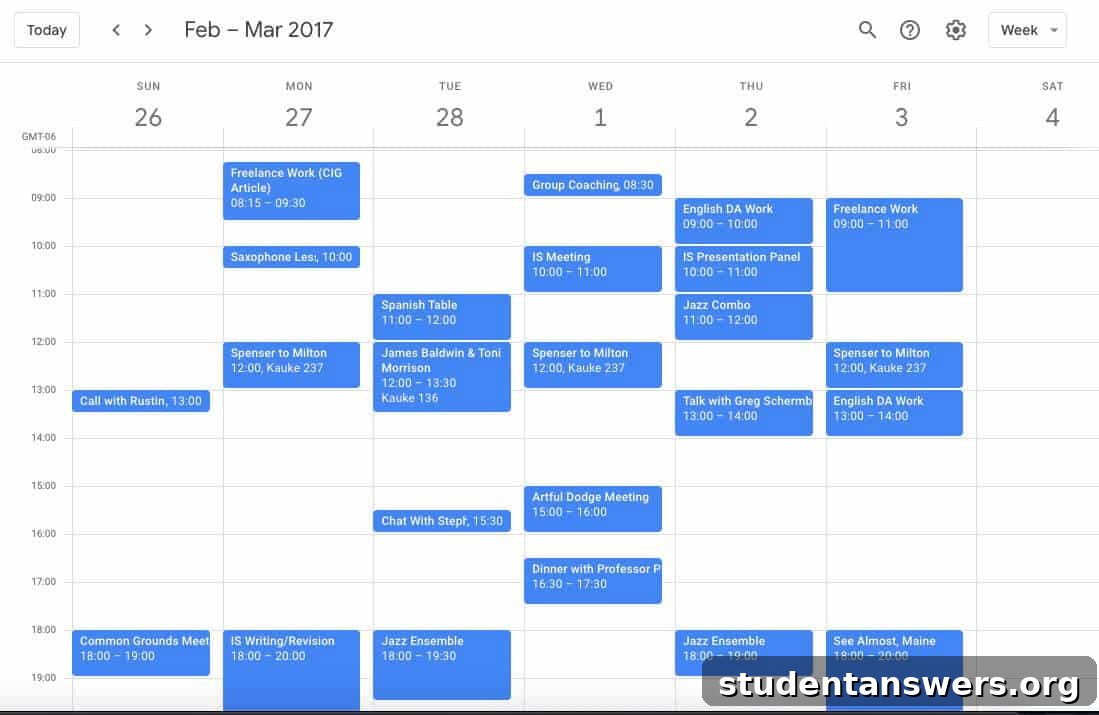
As you can see, blocking out class times prevents any scheduling conflicts. I also included meetings, rehearsals, and dedicated time for freelance work. Notice the blank spaces—it’s crucial to leave room for flexibility, studying, and downtime. While I didn’t schedule specific study blocks, you may find it helpful to add those for your most challenging courses.
2. Conquer Your Tasks with a To-Do List
While a calendar is essential for managing time-specific events, a to-do list is your command center for tasks. Some people try to put everything on their calendar, but this can quickly become cluttered and overwhelming. It’s best to understand the distinction between the two tools:
- A calendar is for things that happen at a specific time and place (e.g., “Psychology 101 Lecture at 10 AM,” “Meeting with Professor Smith at 2 PM”).
- A to-do list is for tasks you need to accomplish, which often have flexibility in when you do them (e.g., “Read Chapter 5 for Psychology,” “Draft outline for history essay”).
For your digital system, an app like Todoist is powerful, intuitive, and offers a generous free version. For a physical approach, the bullet journal method is a popular and highly customizable option. The best system is the one you’ll actually use, so feel free to experiment.
To set up your to-do list, start with another brain dump. List out all the recurring and one-off tasks you’re responsible for:
- All homework assignments for the week
- Household chores like cleaning your room or doing laundry
- Meal preparation and grocery shopping
- Tasks related to your club or job responsibilities
- Personal goals, like practicing a musical instrument or learning a new skill
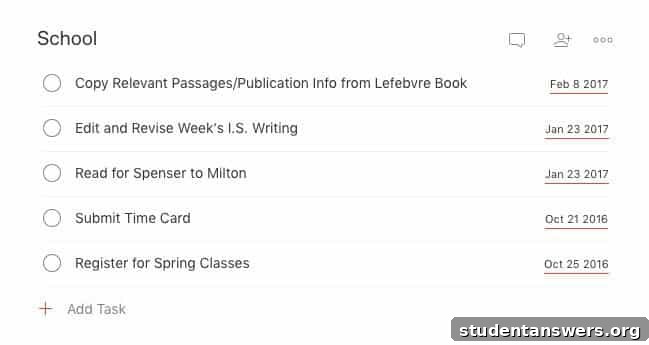
Input these into your chosen system. With a digital app, you can set recurring tasks (like “Take out trash on Tuesday”) and assign due dates to your homework. As new tasks arise, add them immediately so you don’t forget. Here’s a simple example of what a daily task list might look like:
3. Organize Your Notes for Easy Retrieval
Taking good notes in class is only half the battle. If you can’t find and review them effectively, their value diminishes significantly. A disorganized pile of notebooks or random documents makes studying for midterms and finals an incredibly stressful process.
We highly recommend a digital note-taking system. An app like Evernote or Notion allows you to create separate “notebooks” for each class. This keeps everything neatly contained and, most importantly, searchable. If you prefer taking notes by hand—which some studies suggest can improve retention—you can still benefit from a digital system. Simply make it a habit to scan or type up your handwritten notes at the end of each day. This process of transcription also serves as a powerful form of review.
With a digital, organized system, you can instantly search for keywords from a lecture weeks ago, saving you from frantically flipping through pages of a physical notebook.
4. Systematize Your Files and Class Materials
Beyond your personal notes, you’ll accumulate a mountain of other materials for each class: syllabi, lecture slides, PDF readings, and graded assignments. Keeping these organized is just as important as managing your notes.
Create a clear, consistent filing system for both your digital and physical documents. For physical papers, a simple three-ring binder for each class works well. For your digital files, use a cloud storage service like Google Drive or OneDrive. This not only keeps you organized but also backs up your important work.
Establish a logical folder hierarchy. A great structure to follow is:
[SEMESTER] > [COURSE CODE] > [Subfolders: Assignments, Lecture Notes, Readings, Syllabus]
Here’s an example of a well-organized Google Drive folder system:
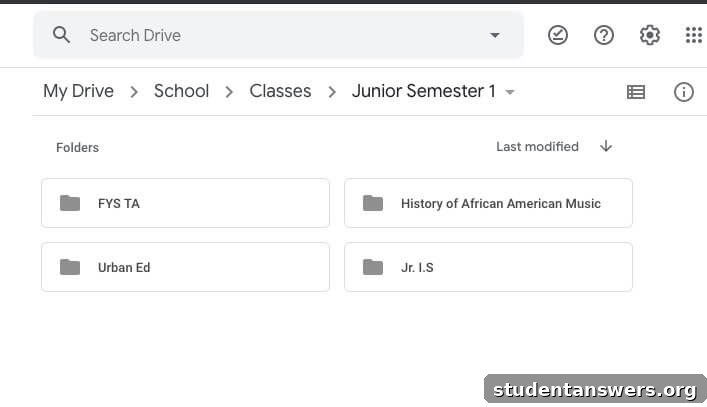
Sticking to this system means you’ll never waste time searching for a file again. Everything will have its designated place.
5. Optimize Your Backpack: Your Mobile HQ
Your backpack is your daily command center. It carries the essential tools you need to succeed on campus. An organized backpack ensures you arrive at every class prepared, while a messy one can lead to the sinking feeling of realizing you’ve forgotten a crucial textbook or assignment.
The single most effective habit for backpack organization is to pack it the night before. This simple trick, likely taught to you in elementary school, is still relevant in college. Packing when you’re not rushed in the morning prevents you from forgetting things. It also gives your brain time to subconsciously recall anything you might have missed.
If you struggle to remember everything, create a recurring checklist in your to-do app. Before you go to bed, you can quickly run through the list to make sure you have everything for the next day’s classes. Here’s how that might look in Todoist:

How to Stay Organized: The Weekly Review Habit
Setting up your systems is a huge step forward, but the real challenge is maintenance. Life is messy, and even the best systems can fall into disarray without regular upkeep. To stay on track, dedicate 30 minutes each week to a simple two-part habit: the weekly review and the weekly planning session.
1. The Weekly Review: Reflect and Adjust
Each week, take a few moments to look back. Life inevitably throws curveballs that disrupt our plans. The goal of the review is not to feel bad about what you didn’t accomplish, but to learn and adapt your system for the future.
- Compare Plan vs. Reality: Look at your calendar and to-do list from the past week. What did you plan to do? What did you actually accomplish? Identify the gaps. Maybe you only made it to the gym once instead of three times, or you procrastinated on a research paper.
- Analyze the “Why”: For each gap, ask yourself why it happened. Did you skip the gym because you were too tired in the evenings? Was your study session unproductive because your friends kept distracting you? Don’t judge yourself; just gather data.
- Make Adjustments: Use this information to make smarter plans for the upcoming week. If evenings are bad for workouts, try scheduling them in the morning. If the student center is too distracting, plan to do your focused work in the quiet section of the library. This continuous feedback loop will make your planning more realistic and effective over time.
2. The Weekly Planning Session: Prepare for Success
After reviewing the past, it’s time to prepare for the future. This is where you set your intentions for the week ahead and ensure your systems are clean and up-to-date.
- Clean Up Your Systems: Go through your to-do list and reschedule any tasks you didn’t complete. Archive or delete completed tasks to clear the clutter. Review your calendar and adjust any upcoming events. File away any loose papers in your binders and digitize any remaining handwritten notes.
- Map Out the Week: Look at your syllabi and online course portals for any new assignments or upcoming deadlines. Add these tasks to your to-do list and put major dates on your calendar. This proactive step prevents you from being surprised by an assignment you forgot about.
- Prepare for Monday: End your session by packing your backpack for the next day. This simple action sets a positive and prepared tone for the start of the week.
Blocking out 30 minutes for this process on your calendar (perhaps Sunday evening) will ensure it becomes a consistent, powerful habit.
Organization Is Your Tool for Success
This guide covers a lot of ground, but the core principles are simple. Let’s recap the key takeaways:
- Use a digital calendar like Google Calendar for all your time-based events.
- Manage your action items with a dedicated to-do list app like Todoist.
- Organize your notes and class files into a searchable, digital system.
- Keep your backpack clean and pack it the night before each day.
- Implement a 30-minute weekly review and planning session to stay on track.
Ultimately, remember that an organizational system is not the goal itself—it is a tool. It’s the vehicle that helps you accomplish what you want to do with less stress and more efficiency. The real work still needs to be done, but with a solid system in place, you are perfectly positioned to do that work and achieve amazing things. Now go out there and make this semester a great one.