

Mastering Secure Online Shopping A 10 Step Guide

Mastering Safe Online Shopping: Your Ultimate Guide to Protecting Your Data
Online shopping offers incredible convenience, bringing a world of products directly to our fingertips. From daily groceries to luxury goods, the digital marketplace has it all. But with this convenience comes a critical responsibility: protecting your personal and financial information. As e-commerce grows, so do the methods used by cybercriminals to exploit unsuspecting shoppers. Are you confident that your online shopping habits are as secure as they could be?
Many of us click “buy now” without a second thought, but understanding the basics of online security can be the difference between a joyful purchase and a financial nightmare. This comprehensive guide will walk you through the essential steps for safe online shopping, covering everything from securing your credit card to identifying a fraudulent website. We will transform you into a savvy, secure online shopper, ready to navigate the digital world with confidence.
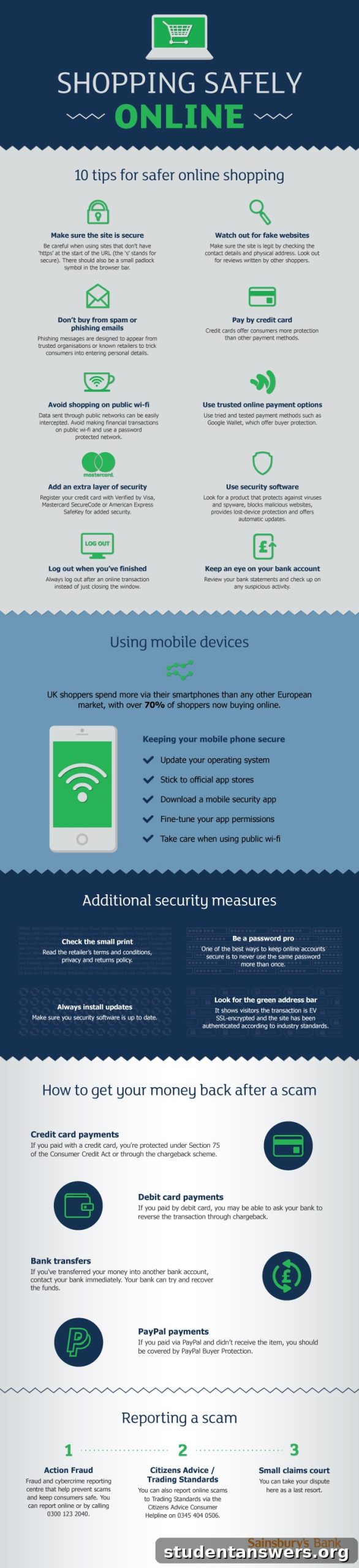
10 Essential Rules for Secure Online Shopping
Navigating the vast world of e-commerce requires more than just a good eye for deals; it demands a proactive approach to security. By integrating the following ten habits into your routine, you can significantly reduce your risk of falling victim to online fraud. Think of these as your personal digital bodyguard, always on watch while you shop.
1. Always Look for the Padlock (HTTPS)
Before you even think about entering personal information on a website, glance at the address bar. A secure website will have a URL that begins with “https://” instead of just “http://”. The ‘S’ stands for ‘Secure,’ and it indicates that the website uses an SSL (Secure Sockets Layer) certificate. This technology encrypts the data exchanged between your browser and the website’s server, making it unreadable to anyone who might try to intercept it. Most modern browsers also display a small padlock icon next to the URL to visually confirm this secure connection. If you don’t see the padlock or “https://”, do not enter any sensitive information, especially payment details.
2. Use Strong, Unique Passwords for Every Account
Password security is a cornerstone of online safety. Using the same simple password across multiple shopping sites is like using the same key for your house, car, and office—if a thief gets one, they have access to everything. A strong password should be long (at least 12 characters) and include a mix of uppercase letters, lowercase letters, numbers, and symbols. Avoid using easily guessable information like your name, birthday, or common words. To manage this effectively, consider using a reputable password manager. These tools can generate and store highly complex passwords for all your accounts, requiring you to only remember one master password.
3. Beware of Phishing Scams
Phishing is a deceptive technique where criminals impersonate legitimate companies to trick you into revealing personal information. These attempts often come in the form of emails, text messages (smishing), or social media messages that create a sense of urgency. They might claim there’s a problem with your order, offer an unbelievable deal, or say your account has been compromised. Look for red flags such as poor grammar, spelling mistakes, generic greetings like “Dear Customer,” and email addresses that don’t match the company’s official domain. Never click on suspicious links directly. Instead, navigate to the company’s website by typing the address into your browser yourself.
4. Opt for Secure Payment Methods
How you pay matters. Credit cards are generally the safest option for online shopping because they offer robust fraud protection. Under federal law, your liability for fraudulent credit card charges is capped at a low amount, and many issuers offer zero-liability policies. Debit cards, on the other hand, are linked directly to your bank account, and if compromised, your funds can be drained quickly. Digital payment services like PayPal, Apple Pay, or Google Pay add another layer of security by acting as an intermediary. They process the transaction without ever exposing your credit card details to the merchant, reducing the risk of your information being stolen in a data breach.
5. Avoid Public Wi-Fi for Financial Transactions
Free public Wi-Fi at cafes, airports, and hotels is convenient, but it’s often unsecured. This means that skilled hackers on the same network could potentially intercept your data, a practice known as a “man-in-the-middle” attack. They can see everything you’re doing, including the passwords and credit card numbers you type. When you need to make a purchase, it is far safer to use your own secure home network or your phone’s cellular data (4G/5G). If you absolutely must use public Wi-Fi, use a Virtual Private Network (VPN). A VPN encrypts all your internet traffic, creating a secure tunnel that makes your data invisible to prying eyes.
6. Keep Your Devices and Software Updated
Software updates aren’t just for adding new features; they frequently contain critical security patches that protect you from newly discovered vulnerabilities. Cybercriminals are constantly looking for weaknesses in operating systems, web browsers, and antivirus programs to exploit. By keeping your computer, smartphone, and all applications up to date, you ensure that these security holes are sealed. Enable automatic updates whenever possible to stay protected without having to think about it.
7. Enable Two-Factor Authentication (2FA)
Two-Factor Authentication adds a powerful second layer of security to your accounts. Even if a criminal manages to steal your password, they won’t be able to log in without the second factor. This is typically a temporary code sent to your phone via text message, an authenticator app, or a biometric scan like your fingerprint. Most major online retailers and financial institutions now offer 2FA. It takes only a few extra seconds to log in but provides a massive boost to your account’s security. Enable it on every account that offers it.
8. Research Sellers and Read Reviews
The internet is filled with legitimate businesses, but it also hosts many fraudulent storefronts designed to steal your money or data. Before buying from an unfamiliar retailer, do some research. Search for the company’s name along with terms like “review,” “scam,” or “complaint.” Look for detailed, balanced reviews from multiple sources. Be wary of sites with only overwhelmingly positive, generic reviews, as they could be fake. Check for a physical address and a customer service phone number; legitimate businesses will have clear contact information.
9. Understand the Privacy Policy
While it may seem tedious, taking a moment to review a website’s privacy policy can be very revealing. This document outlines how the company collects, uses, and protects your personal data. Look for information on whether they share your data with third parties. A reputable company will be transparent about its data practices. If a site has no privacy policy or its terms are vague and concerning, it’s best to take your business elsewhere.
10. Regularly Monitor Your Financial Statements
Don’t wait for your monthly statement to arrive in the mail. Get into the habit of checking your credit card and bank account statements online at least once a week. This allows you to quickly spot any unauthorized or suspicious charges. The sooner you detect fraud, the faster you can report it to your financial institution and limit the damage. Many banks also offer real-time transaction alerts via email or text, which can notify you immediately of any activity on your account.
What to Do If Your Information is Compromised
Even with the best precautions, security incidents can still happen. If you suspect your financial information has been stolen or an account has been compromised, act immediately. Time is critical.
- Contact Your Bank or Credit Card Issuer: Report any fraudulent charges immediately. They will cancel the compromised card and issue a new one. They will also guide you through the process of disputing the charges.
- Change Your Passwords: If you believe an account has been hacked, change the password for that site immediately. If you reuse that password on other sites (which you shouldn’t!), change it on all of those accounts as well.
- Report the Incident: Report the fraud to the relevant authorities. This helps law enforcement track down criminals and can prevent others from becoming victims.
- Place a Fraud Alert: Consider placing a fraud alert or credit freeze on your credit reports with the major credit bureaus (Equifax, Experian, TransUnion). This makes it harder for criminals to open new accounts in your name.
Conclusion: Shop with Confidence
Online shopping should be a safe and enjoyable experience. By being mindful and proactive, you can protect yourself from the vast majority of online threats. Integrating these security practices into your routine—using strong passwords, verifying site security, being cautious with payments, and staying vigilant—empowers you to shop with confidence. The digital marketplace is full of amazing opportunities; with the right knowledge, you can explore it safely and securely.