

Navigating Professional Communication A Beginners Blueprint

Mastering Professional Communication: A Student’s Guide to Email, Calls, and More
In college, you spend countless hours perfecting your academic writing. From research papers to lab reports, you learn how to build arguments and present findings. But what about the communication skills you need outside the classroom? We’re not talking about your social media bios; we’re talking about the professional communication that will define your career.
The professional world might seem distant now, but it approaches faster than you think. Soon you’ll be applying for internships, landing your first job, or starting a freelance business. In every one of these scenarios, how you communicate can make or break your success. Clear, confident, and professional communication is no longer a soft skill—it’s an essential tool for navigating the modern workplace.
This comprehensive guide will equip you with the skills you need to excel. We’ll explore the nuances of every communication channel you’re likely to encounter, providing clear do’s and don’ts for each. We will cover all forms of modern written communication:
- Text Messages
- Team Chat Apps (like Slack or Teams)
- Project Management Software
We’ll also dive into the art of spoken communication, helping you navigate:
- Phone Calls and Conference Calls
- Video Meetings
- In-Person Interactions
By the end of this guide, you’ll have a clear roadmap for communicating effectively, building strong professional relationships, and confidently stepping into your career. Let’s begin.
Essential Written Communication Skills for the Modern Workplace

Text-based communication is the backbone of most modern businesses, especially with the rise of remote and hybrid work. While old-school business textbooks might talk about memos and faxes, today’s workplace runs on email, instant messaging, and collaborative software. This section focuses on the short-form, day-to-day written communication that you’ll use constantly. We’re not covering formal documents like cover letters or proposals here, but mastering these fundamentals is the first step toward success.
1. Email: The Cornerstone of Professional Correspondence
Despite constant predictions of its demise, email remains the primary tool for formal and semi-formal communication in the professional world. With over four decades of use, you’d think everyone would be an expert. The reality? Most people are terrible at email. The reason is simple: it’s a skill that’s rarely taught formally. We learn to write essays in school and text messages from friends, but professional email etiquette is often learned through trial and error.
Most ineffective emails share a few common flaws:
- Vague or Missing Subject Line: The recipient has no idea what the email is about or its priority level.
- Inappropriate Tone: The message is either too casual and unprofessional or too stiff and robotic.
- Poor Structure: The email is a wall of text with no clear point or question.
- No Clear Call-to-Action: The recipient is left wondering, “What do you want me to do?”
- Typos and Grammatical Errors: A lack of proofreading makes the sender appear careless and unprofessional.
To illustrate, let’s look at a common scenario: a student emailing a professor for help. Here is an example of what not to do:
Subject: help
hey prof,
im really confused about the paper due tomorow. i dont get the prompt and i’ve been stuck for hours. can u help me? i dont know what to write about. its just really hard.
This email fails on every level. The subject is useless, the tone is overly casual and unprofessional (including spelling the professor’s title wrong), it’s filled with typos, and it’s completely unspecific. The professor has no idea which class or paper the student is referring to and has no clear way to help. It puts all the work on the recipient to solve the sender’s problem.
Now, let’s see how we can transform that request into a professional, effective email:
Subject: Question Regarding Thesis for HIST 201 Paper
Dear Professor Frank,
I hope you are having a good week. I am writing to you today about the upcoming research paper for our American History to 1865 class, which is due this Wednesday.
I have completed my initial research and have a draft outline, but I am struggling to refine my thesis statement to be more specific and arguable. I have reviewed the assignment guidelines and the resources you provided on the class website, but I would greatly appreciate your feedback.
Would you be available for a brief 10-15 minute meeting before class on Wednesday? I am available anytime on Tuesday between 1 p.m. and 4 p.m. Please let me know if that works for you or if another time would be more convenient.
Thank you for your time and guidance.
Sincerely,
Ransom Patterson
Student ID: 12345
This revised email is a world of difference. Here’s why it works:
- Clear Subject Line: The professor immediately knows who the email is from, what it’s about, and its context.
- Professional Tone: It uses a proper salutation, is polite, and shows respect.
- Provides Context: It specifies the class and the assignment.
- Shows Initiative: The student explains what they’ve already done, demonstrating they aren’t looking for an easy answer.
- Clear and Actionable Request: The student asks for a specific type of help (feedback on a thesis) and proposes concrete meeting times, making it easy for the professor to say “yes.”
- Professional Closing: It includes a polite sign-off and the student’s full name for easy identification.
Applying these principles to every professional email you write will ensure your messages are read, respected, and acted upon.
2. Text Messages: For Urgent and Informal Updates
Texting for work is becoming more common, but it occupies a tricky space between casual and professional. The rules of email etiquette—clarity, professionalism, and proofreading—still apply, but the context is different. Brevity is key, and the tone is typically less formal than email.
The most important rule of professional texting is to use it sparingly and appropriately. Sending a work-related text implies a degree of urgency. Only text a colleague or manager when:
- You need a quick answer to a time-sensitive question (“Are you at the conference center yet? I can’t find the main entrance.”).
- There is an urgent update (“The client meeting has been pushed back 30 minutes.”).
- You have been unable to reach them through other channels for an important matter.
Avoid texting for non-urgent matters, complex discussions, or anything that requires a detailed record. Stick to email or chat apps for those conversations. Always respect business hours, and keep the use of emojis and slang to a minimum unless you are certain it aligns with your company’s culture.
3. Team Chat Apps: The Digital Office Water Cooler
Platforms like Slack and Microsoft Teams have revolutionized internal team communication. They are designed for quick questions, collaborative brainstorming, and sharing updates in a more fluid way than email. These apps often feel like a blend of group text messaging and a private social media forum.
The key to success on these platforms is understanding the established etiquette of your team. When you first join a company, take some time to observe. How do people communicate in public channels? Is it all business, or is there room for jokes and memes? When in doubt, err on the side of professionalism.
Best practices for team chat apps include:
- Use Channels and Threads: Keep conversations organized by posting in the correct channel and using threads to reply to specific messages. This prevents clutter and makes information easier to find later.
- Be Mindful of Notifications: Don’t “@” everyone in a channel unless the message truly requires their immediate attention. Use specific user mentions when a direct response is needed.
- Set Your Status: Let your colleagues know when you are in a meeting, at lunch, or away from your desk. This manages expectations about your response time.
4. Project Management Apps: Communication for Clarity
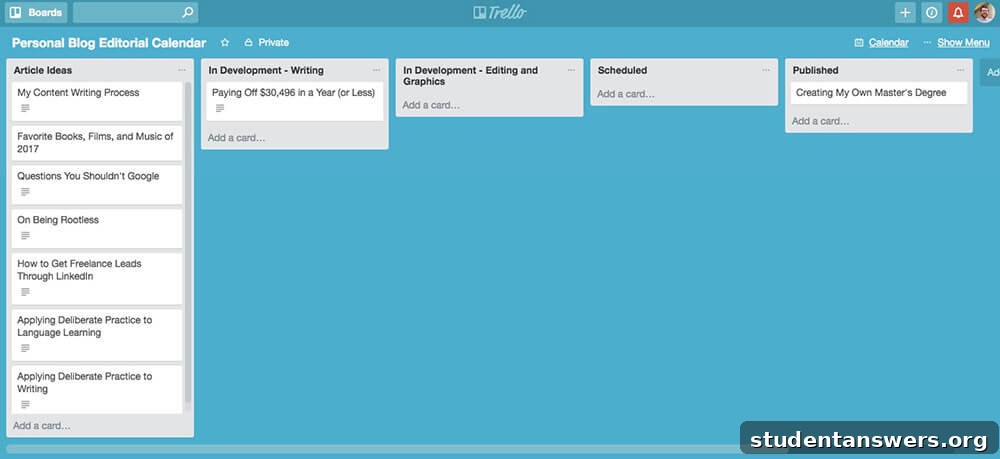
Tools like Asana, Trello, or Basecamp are essential for keeping complex projects organized. Communication within these apps serves a very specific purpose: to provide clear, concise updates on the status of work. When you leave a comment on a task, it should be direct and to the point.
Your goal is to document progress and clarify next steps. Avoid long, rambling comments. If a detailed discussion is needed, move the conversation to a chat app or schedule a quick call. A good comment in a project management tool might look like this: “Draft complete and attached for review. @JaneDoe, can you please provide feedback by end of day tomorrow?” This message is short, provides a status update, attaches the relevant file, and clearly assigns the next action to a specific person with a deadline.
Mastering Spoken and In-Person Communication
While digital communication dominates, spoken interactions remain crucial for building relationships, resolving complex issues, and conveying nuance that text cannot capture. From phone interviews to team meetings, your ability to communicate effectively verbally is a powerful asset.
1. Phone Calls: Clarity and Professionalism Without Visuals

In an age of endless messaging apps, a phone call can feel antiquated, but it remains a vital tool for urgent or sensitive conversations. Without visual cues, your tone of voice and listening skills become paramount.
Here are some key principles for professional phone calls:
- Start with a Professional Greeting: Always begin by identifying yourself and your organization. For example: “Hello, this is [Your Name] from [Company]. Am I speaking with [Person’s Name]?”
- Have a Clear Objective: Before you dial, know exactly what you need to accomplish with the call. This prevents rambling and respects the other person’s time.
- Practice Active Listening: Don’t just wait for your turn to talk. Listen carefully to what the other person is saying. After they finish a point, pause for a second or two before you respond. This gives them a chance to add anything else and shows that you are thoughtfully considering their words.
- Speak Clearly and Pace Yourself: Talk slightly slower than you normally would and enunciate your words. This is especially important when conveying names, numbers, or technical information.
- Don’t Hesitate to Ask for Clarification: If you miss something, it’s better to ask someone to repeat or spell it out than to proceed with incorrect information. A simple “I’m sorry, I didn’t quite catch that. Could you please spell that name for me?” is perfectly acceptable.
- Take Notes: Keep a notebook or a digital document open to jot down key points, action items, and follow-up questions. This creates a record of the conversation and ensures you don’t forget important details.
For conference calls, these rules become even more critical. Always introduce yourself when you join, mute your microphone when you’re not speaking to eliminate background noise, and be concise to keep the meeting on track.
2. Video Calls: The New Face-to-Face Meeting

Video calls are a staple of modern work, blending the immediacy of a phone call with the non-verbal cues of an in-person meeting. To make a great impression, you need to manage your technology and your presence.
Follow these guidelines for effective video calls:
- Prepare Your Tech: Test your camera, microphone, and internet connection a few minutes before the meeting starts. Nothing derails a call faster than technical difficulties.
- Control Your Environment: Choose a quiet location with minimal distractions. Pay attention to your background—it should be clean and professional. A simple wall or a virtual background is often the best choice. Ensure you have good lighting, ideally coming from in front of you, not behind.
- Dress Professionally: Wear the same attire you would for an in-person meeting at your company. It shows respect and puts you in a professional mindset.
- Engage with the Camera: When you are speaking, try to look directly at the camera, not at the screen. This simulates eye contact with the other participants and makes you appear more engaged and confident.
- Stay Focused: Close unnecessary tabs and silence notifications on your computer and phone. Avoid multitasking. People can tell when you’re not paying attention, and it’s disrespectful to everyone on the call.
3. In-Person Communication: Building Rapport and Trust
In-person interactions are the most powerful form of communication. They offer the full spectrum of non-verbal cues—body language, facial expressions, and tone—that are essential for building strong professional relationships. Whether it’s a formal meeting or a casual chat in the hallway, your in-person conduct matters.
- Listen More Than You Speak: The most effective communicators are often the best listeners. Give the other person your undivided attention. Don’t interrupt or formulate your response while they are still talking.
- Be Present and Attentive: Put your phone away and close your laptop unless it’s essential for the meeting. Make eye contact and use open body language. Avoid crossing your arms, fidgeting, or looking around the room, as this can signal boredom or nervousness.
- Think Before You Speak: In a fast-paced conversation, it’s tempting to speak impulsively. Take a moment to organize your thoughts. A brief, thoughtful pause is better than rambling without a clear point.
Conclusion: The Universal Principles of Effective Communication
Whether you are crafting an email, joining a video call, or speaking with a colleague face-to-face, the core principles of effective communication remain the same: clarity, professionalism, and respect. Your goal should always be to make your message easy to understand and to make the person you are communicating with feel heard and valued.
Mastering these skills takes practice, but the effort is one of the best investments you can make in your career. By approaching every interaction with thoughtfulness and intention, you will build a reputation as a clear, confident, and reliable professional—an invaluable asset in any field.