
In the whirlwind of college life, discovering a tool that can genuinely simplify your academic journey feels like finding a hidden treasure. For me, that treasure was Evernote. It’s no exaggeration to call it my “second brain.” While it may lack biological neurons, Evernote has become the ultimate digital repository for every piece of information I need to capture, organize, and recall. It’s a constant companion on my laptop and an essential app on my phone, serving as the central hub for everything from brainstorming article ideas to managing complex academic projects.
Back in my student days, Evernote was just as indispensable as it is for me today as a professional. Its power lies in its simplicity and versatility. It’s more than just a note-taking app; it’s a comprehensive system for managing the information overload that defines a student’s life. If you’re looking to boost your productivity and bring order to your studies, you’ve come to the right place. Here are six powerful ways to use Evernote to transform your academic experience and achieve better results with less stress.
1. Master Digital Note-Taking for Your Classes
The age-old debate of typing versus handwriting notes in class will likely never end. However, the advantages of digital note-taking, especially with a tool like Evernote, are undeniable. While a handwritten notebook can be lost, damaged, or become an unsearchable mess, your digital notes are safely stored in the cloud, accessible from any device, and protected by redundant backups. That peace of mind alone is a game-changer.
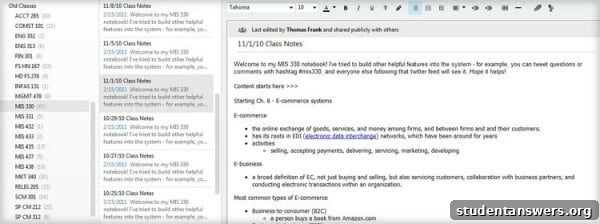
Taking notes in Evernote was my primary use for the app in school. Since most people can type significantly faster than they can write, I was able to capture more detailed and comprehensive notes during lectures. This meant I could record not just the key points from the slides but also the professor’s nuanced explanations, illustrative examples, and answers to other students’ questions. This depth of information proved invaluable during exam season.
Furthermore, Evernote empowers you to structure your notes on the fly. By mastering a few simple keyboard shortcuts, you can effortlessly create nested bullet points, checklists for action items, and tables to compare complex theories. You can bold key terms, italicize important concepts, and use highlighters to make critical information stand out. This level of organization is difficult to achieve with handwritten notes, which often decline in legibility as a lecture progresses and your hand gets tired.
The organizational structure is where Evernote truly excels. Instead of managing dozens of scattered Word documents or one massive, unwieldy file for an entire course, you can create a clean, logical hierarchy. A common best practice is to create a “Notebook Stack” for the current semester, then a separate “Notebook” for each class within that stack. Each new lecture gets its own “Note,” automatically dated and titled for easy reference. This system keeps everything tidy and intuitively searchable.
2. Enrich Your Notes with Web Clippings and External Links
A lecture often serves as an introduction to a topic, not a complete exploration. Your professor might mention a concept that piques your curiosity or that you find particularly challenging. With traditional paper notes, you might scribble a reminder to “look this up later,” a task that often gets forgotten in the shuffle of student life.
When you take notes in Evernote, you can bridge that knowledge gap in real time. If a professor mentions a historical event, a scientific theory, or a business case study, you can perform a quick web search. When you find a reliable article, a detailed study, or an insightful video, you can create a hyperlink directly within your lecture notes. This transforms your notes from a static record into a dynamic, interconnected web of knowledge.
To take this a step further, you can use the powerful Evernote Web Clipper browser extension. Instead of just linking to a webpage, the Web Clipper allows you to save the entire article, a simplified version of it, or even just a specific section directly into your Evernote account. You can then use Evernote’s internal “note link” feature to link your lecture notes directly to the clipped article. This ensures you have access to that valuable external information even if the original webpage is taken down. My own notes from my information systems course are filled with these kinds of links, and they were crucial for deepening my understanding of the material when reviewing for exams.
3. Digitize and Search Handwritten Notes Instantly
Of course, digital note-taking isn’t always the best solution. For subjects heavy with equations, formulas, diagrams, or complex symbols—like mathematics, physics, or organic chemistry—pen and paper often remain superior. The flexibility and freedom of handwriting are hard to replicate on a keyboard for non-linear information.
But this doesn’t mean you have to abandon the organizational power of Evernote. The mobile app includes a brilliant document scanner. After your lecture, simply take a picture of your handwritten notes using the Evernote camera. It will automatically detect the page borders, remove shadows, and enhance the contrast to create a crisp, legible digital copy. You can then file this scanned note into the appropriate class notebook alongside your typed notes, keeping all your course materials in one unified location.
This provides all the standard benefits: you can tag your notes, add reminders, and link them to other resources. But Evernote has a truly remarkable feature that sets it apart: its powerful Optical Character Recognition (OCR) makes the text in your handwritten notes searchable.
This is a lifesaver during finals week. Imagine you have a semester’s worth of notes and you need to review every mention of “Bayes’ Theorem.” Instead of manually flipping through a massive notebook, you can simply type the term into Evernote’s search bar. In seconds, it will highlight every instance where you wrote that phrase. This ability to instantly locate specific information within a vast archive of notes is one of the most compelling reasons to digitize your paper-based work.
4. Overcome Writer’s Block with the Brain-Dump Technique
Procrastination, especially when it comes to writing essays and research papers, is a universal student struggle. The pressure of a blank page and a looming deadline can be paralyzing. We often get stuck because we try to write and edit simultaneously, a process known as self-censoring. We type a sentence, immediately judge it as imperfect, delete it, and repeat the cycle until frustration sets in.
To break this cycle, I use a simple yet effective technique in Evernote called the brain-dump. Before I begin writing the actual paper, I create a new note and dump every single thought, idea, question, and fragment related to the topic into it.
This is a judgment-free zone. The goal is not to write beautiful prose but to get all the raw material out of my head and onto the page. My brain-dump notes are usually a chaotic mix of:
- Bulleted lists of key arguments
- Half-formed sentences and phrases
- Questions I need to research
- Relevant quotes I’ve found
- Links to articles and sources
By separating the idea generation phase from the writing and structuring phase, you liberate your mind to be creative without the pressure of perfection. Once the brain-dump is complete, you have a rich inventory of ideas to work with. You can then organize these points into a logical outline within the same note before moving to your word processor to write the first draft. This technique makes the writing process far less intimidating and much more efficient.
5. Turn Downtime into Study Time with Mobile Syncing
One of the most significant challenges for busy students is finding enough time to study. However, we all have small pockets of “dead time” throughout the day: the bus ride to campus, waiting in line for coffee, or the ten minutes before a class begins. With Evernote, you can transform this downtime into productive micro-study sessions.
Because Evernote seamlessly syncs across all your devices, the detailed notes you took on your laptop in a morning lecture are immediately available on your smartphone. You can review key concepts, quiz yourself on vocabulary terms, or read over a clipped article while on the go. While last-minute cramming isn’t the most effective learning strategy, these frequent, short review sessions utilize a principle called spaced repetition, which is scientifically proven to improve long-term memory retention. It’s a simple way to reinforce what you’ve learned without having to schedule large, dedicated blocks of study time.
You can even create your own simple flashcards. For any given topic, create a note where the title is a question or a key term, and the body of the note contains the answer or definition. When reviewing on your phone, you can read the title and try to recall the answer before revealing the note’s content. It’s a quick and effective way to self-test your knowledge anywhere, anytime.
6. Archive Online Quizzes and Assignments for Easy Revision
Many courses use online learning platforms like Blackboard or Canvas for frequent quizzes and homework assignments. The results of these quizzes are often prime study material, as they directly reflect what your professor considers important. However, these platforms can be clunky, and it may be difficult to access old quiz results later in the semester.
An easy solution is to archive them in Evernote. After you complete an online quiz and receive your results, use the Evernote Web Clipper or simply take a screenshot to save the entire page—questions, your answers, and the correct answers—into a new note. File it in your course notebook and tag it as “quiz.” When it comes time to study for your midterm or final, you’ll have a repository of practice questions and a clear record of concepts you struggled with, all easily accessible and searchable.
A Quick Note: Always be mindful of your institution’s academic integrity policies. Saving your own graded quiz for personal study is generally acceptable, but be sure you’re not copying or distributing exam materials that are meant to be secure.
Conclusion: Your All-in-One Academic Hub
By implementing these strategies, Evernote can evolve from a simple note-taking app into the command center for your entire academic life. It helps you capture information more effectively, organize it logically, enrich it with external resources, and access it whenever and wherever you need it.
Beyond these six core academic uses, Evernote’s utility extends to all areas of student life:
- Job and Internship Hunting: Keep a notebook to track applications, save different versions of your resume and cover letter, and clip job descriptions.
- Group Project Management: Use shared notebooks and checklists to delegate tasks, track deadlines, and collaborate with your peers.
- Personal Knowledge Base: Save articles, ideas, and inspiration that interest you, building a personal library of knowledge that will serve you long after you graduate.
- Travel Planning: Organize flight details, hostel confirmations, and lists of places to visit for your spring break or study abroad adventures.
Embracing a tool like Evernote is about more than just getting organized; it’s about building an effective system that reduces stress, saves time, and empowers you to learn more deeply. Start by trying just one of these tips, and you’ll soon discover why so many students and professionals consider it their indispensable second brain.