

Mastering Digital Organization for College Success
The Ultimate Guide to File Organization for College Students
There are certain phrases that echo in the halls of every college campus, spoken with a universal tone of rising panic. But one question stands above them all, a testament to digital chaos and looming deadlines:
“Oh no, where did I save that file?”
If you’ve ever felt that cold wave of dread, you’re not alone. The college experience is an avalanche of digital information. Every class introduces a flurry of syllabi, assignments, research papers, and lecture notes. Add to that your resume, cover letters for internships, club documents, and personal projects, and you’re left with a digital landscape that can quickly become an unnavigable mess.
Many students operate in a state of organized chaos, saving files wherever feels convenient in the moment. This short-sighted approach inevitably leads to disaster. There is nothing more stressful than frantically searching your computer for History_Paper_Final_Draft_7_RealFinal.docx minutes before the submission deadline, only to discover it’s buried in a folder full of video game screenshots.
Today, we’re putting an end to that chaos. This guide will walk you through a simple yet powerful system for organizing your digital life. By implementing these strategies, you can achieve what many students think is impossible:
- Never lose an important school file again.
- Access any file you need, from any device, at any time.
- Spend seconds, not minutes, locating exactly what you’re looking for.
The transition from digital clutter to pristine organization requires a small upfront investment of your time. You’ll need to set up your system and, more importantly, commit to using it. But the payoff—reduced stress, saved time, and the peace of mind that comes with complete control over your work—is immeasurable. If you’re ready to declutter your digital life and boost your productivity, let’s begin.
Step 1: Build Your Foundation in the Cloud
Before you create a single folder, you need to establish a central, accessible hub for all your important files. This is where cloud storage becomes non-negotiable. Forget about relying on a single laptop hard drive or a collection of easily lost USB sticks. A cloud storage service is the foundation of a modern, resilient file organization system.
The most popular and reliable option for this is Dropbox. If you’re not familiar with it, here’s a quick overview of its game-changing features for students:
- Automatic Syncing: Dropbox creates a special folder on your computer. Anything you save in this folder is automatically uploaded to the cloud and then synced across all other devices where you have Dropbox installed, like your phone or a library computer.
- Universal Access: Your files are no longer trapped on one machine. You can access everything from the Dropbox website or mobile app, anywhere you have an internet connection. This means you can finish an assignment in the library even if you left your laptop in your dorm room.
- Version History & Recovery: Accidentally delete a crucial paragraph? Dropbox often keeps previous versions of your files, allowing you to roll back to an older save. It’s a safety net that can save you from catastrophic mistakes.
- Easy Collaboration: Sharing folders with classmates for group projects is incredibly simple, ensuring everyone is working from the same set of documents.
Using a service like Dropbox eliminates the most common points of failure for students. It makes your digital life portable and secure. Most services, including Dropbox, offer a generous free tier (often starting at 2 GB) which is more than enough for documents, PDFs, and presentations. If you work with larger files, like video or high-resolution design projects, you can often earn more free space through referrals or opt for an affordable paid plan.
Step 2: Design a Logical Folder Structure
With your cloud storage set up, it’s time to create the filing cabinet. The goal is to build a structure that is so intuitive you never have to guess where a file should go. We’ll use a top-down approach, starting broad and getting more specific.
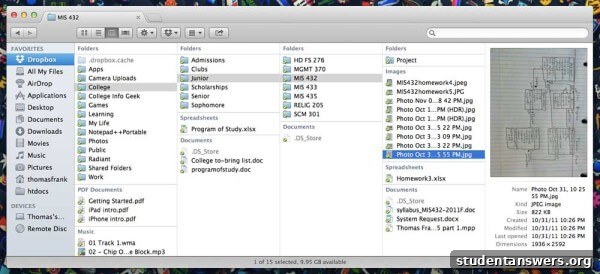
Inside your main Dropbox folder, create a few high-level folders that represent the major areas of your life. For most students, this will look something like this:
- Academics
- Career
- Personal
- Clubs & Activities
The “Academics” folder is where the real magic happens. This is your command center for your entire college career. To avoid it becoming a junk drawer, we will structure it by time. Start by creating a folder for the current academic year, for example, “2023-2024”.
Inside the academic year folder, create folders for each semester, such as “Fall 2023” and “Spring 2024”. This keeps your current classes front and center while archiving past coursework neatly. Finally, within each semester’s folder, create a specific folder for each class you are taking. Be descriptive with the names.
Your final path should look like this: Academics > 2023-2024 > Fall 2023 > ENGL 101 - Intro to Literature
Inside each class folder, you can create a few standard subfolders to keep things tidy:
- Assignments: For all your essays, problem sets, and submitted work.
- Lecture Notes: A home for all your notes, whether typed or scanned.
- Readings & Resources: For PDFs, articles, and other materials provided by the professor.
- Exams: For study guides and practice tests.
A Quick Word on File Naming
Your folder structure is only half the battle. Naming your files consistently is just as important. Avoid generic names like “Essay.docx”. A great naming convention includes the date, class, and assignment description. For example:
2023-10-28_ENGL101_Midterm-Essay_v2.docx
This format is fantastic because it automatically sorts your files chronologically, and you can tell exactly what a file is without even opening it.
Step 3: Implement a Foolproof Backup Strategy
A few years ago, a student in my university library was in tears. Her laptop’s hard drive had completely failed, and the repair shop said the data was unrecoverable. She had no backups. Years of work, photos, and memories were gone in an instant.
Don’t let this be you. It’s crucial to understand a key concept: syncing is not the same as backing up. Dropbox syncs your files, which is great for access, but if you accidentally delete a file, that deletion syncs everywhere. If your file gets corrupted by a virus, the corrupted version syncs. A true backup is a separate, secure copy of your files.
The gold standard in data protection is the 3-2-1 Backup Rule:
- Have at least THREE total copies of your data.
- Store these copies on TWO different types of media (e.g., your computer’s internal drive and an external hard drive).
- Keep ONE copy off-site.
Your cloud storage (Dropbox) already serves as your off-site copy. To complete the strategy, all you need is an external hard drive. Once a month, set a reminder to simply copy your entire “Academics” folder from Dropbox onto your external hard drive. This simple habit ensures that even in a worst-case scenario—like losing access to your cloud account and your laptop simultaneously—you still have a secure copy of your most important work.
Step 4: Maintain the System with Discipline
A perfectly designed organization system is useless if you don’t use it. The final, and perhaps most important, step is to cultivate the discipline to maintain it. This doesn’t require a huge amount of effort, just a little mindfulness.
When you download a syllabus or start a new assignment, take the extra five seconds to save it in its correct folder. Resist the powerful temptation to just dump everything onto your Desktop. Think of your Desktop as a temporary workbench, not a permanent storage facility. At the end of each day or week, take a few minutes to clear off your Desktop and your Downloads folder, moving every file to its proper home within your Dropbox structure. This small, consistent effort is the key to long-term digital clarity and prevents you from ever having to deal with a massive cleanup project.
This organized approach will save you countless hours of searching and immense amounts of stress over your college career. By combining the power of the cloud, a logical folder structure, and a robust backup plan, you can finally stop worrying about where your files are and focus on what really matters: learning.